

Descripziun
Stop typing the same words over and over. Save your frequently used text in a handy floating collector, then reuse it wherever you write on your WordPress site.
Product descriptions, introductions, customer replies, addresses, disclaimers and favourite phrases: keep them organised, close at hand and ready to insert in a click.
Select. Collect. Reuse. Highlight text and click Collect. Your snippet is saved to your personal library. When you need it again, click the saved clip to insert it at your editing cursor, or copy it to the clipboard.
Why use Text Collector?
- Collect text from the front end or admin area of your own WordPress site while logged in.
- Keep a floating scratchpad nearby as you work, with a draggable dock and quick-access folders.
- Save selected text or paste from your clipboard without opening another application.
- Organise clips in colour-tagged folders, with optional folder notes.
- Insert text at your cursor in the block editor, Classic editor and supported text fields.
- Manage your library on a dedicated Text Clips page: edit, copy, print or delete clips.
- Move clips between folders and export folders as plain-text files.
- Keep snippets private to your account, stored in your own site’s database. The free plugin makes no external service requests.
A simpler workflow for repeated text
1. Collect: Select a sentence, paragraph or short block of text and click Collect. Optional cleanup can capitalise the first letter, collapse extra whitespace and remove invisible characters.
2. Organise: File it in your Main folder or create colour-coded folders for product copy, client responses, legal notices, notes or anything else. Folders are unlimited; each holds 20 clips by default, and developers can change the capacity with filters.
3. Reuse: Open the floating dock and click a saved clip to insert it where you are writing. If no insertion point is active, copy it to the clipboard instead.
Unlike layout-focused reusable blocks, Text Collector is designed for everyday words and passages you want to use again.
Free features
The free version includes the complete collect, organise and reuse workflow: floating dock, selection Collect bubble, folders, colour tags, notes, insertion at cursor, clipboard actions, Text Clips management and plain-text export.
Additional tools in Pro
- Live Text: Recognise and collect text from images hosted on your site, directly in your browser. No image is uploaded for recognition.
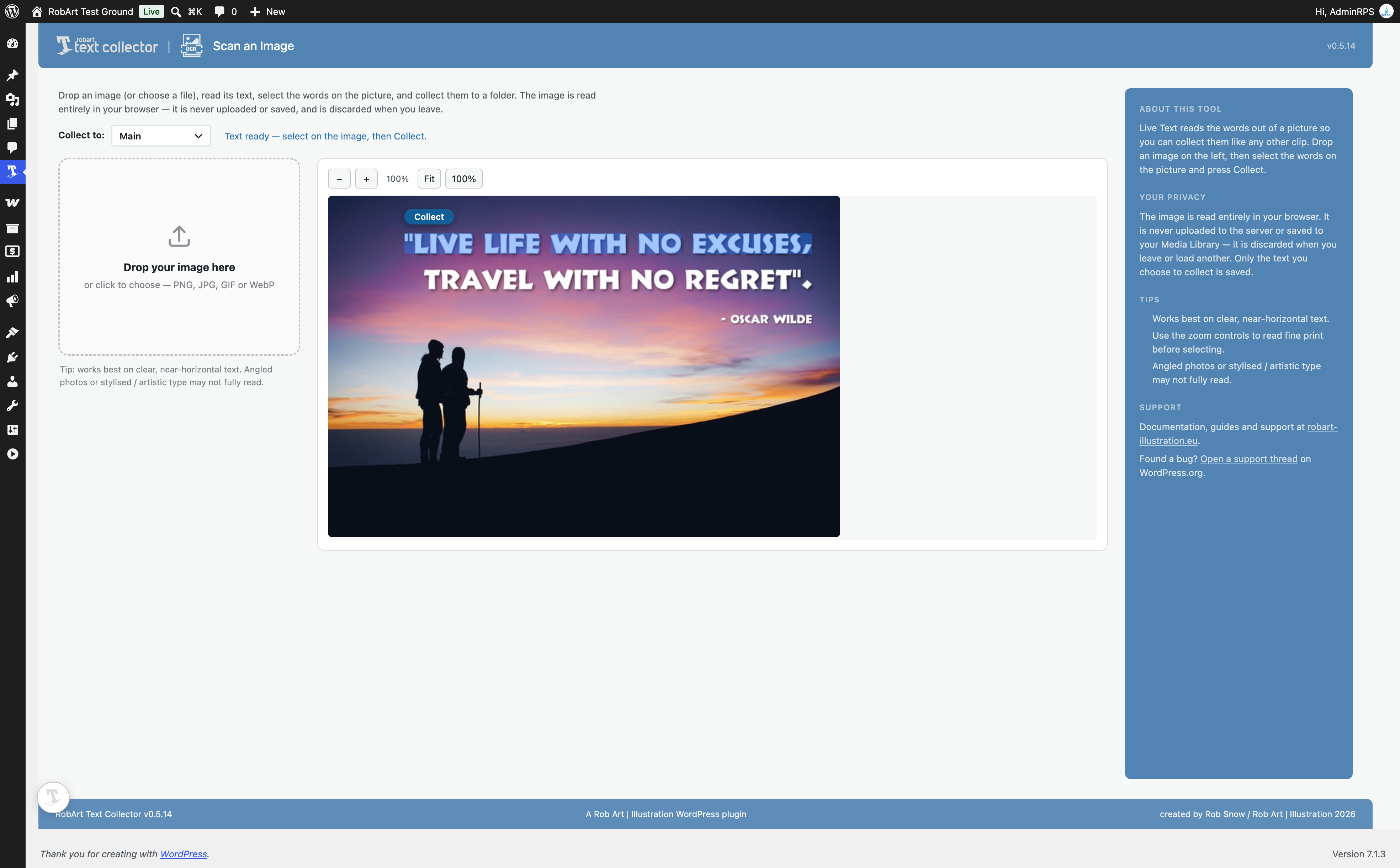
- Scan an Image page: Choose, drop or paste an image, inspect its zoomable preview and collect recognised text.
- Search and filter saved clips.
- Alt-drag reordering of folders and clips.
- CSV and RTF export, including column choices.
Pro is a separate, one-time purchase that includes version 1.x updates. Only the Pro add-on contacts the licence server; the free plugin does not.
Privacy and external services
The free plugin stores your folders and clips in your site’s database, scoped to your user account, and makes no external requests. The optional Pro add-on validates licences through robart-illustration.eu, which checks Lemon Squeezy. It transmits the licence key and site URL during activation, deactivation and periodic verification, not the content of your clips. See the External Services section below for details.
External Services
The free plugin makes no external requests — your clips are stored only in your own site’s database.
The paid RobArt Text Collector Pro add-on (a separate download, not part of this free plugin) validates your licence key with the author’s licence server so Pro features can be unlocked on your site. This applies only if you install the Pro add-on and enter a key.
- Service: RobArt / WPRobarts licence server at robart-illustration.eu, which in turn verifies the licence with Lemon Squeezy (the payment processor).
- What is sent, and when: your licence key and your site URL — sent only when you activate a licence, deactivate it, or during a periodic background re-check of an active licence. No personal data, and nothing about your clips, is ever sent.
- Why: to confirm the licence is valid and tied to your site, and to release Pro updates to licensed sites.
- Terms & privacy: see the author’s site at https://robart-illustration.eu/ for the privacy policy and terms of service, and Lemon Squeezy’s policies at https://www.lemonsqueezy.com/privacy and https://www.lemonsqueezy.com/terms .
Support
Questions, bug reports and feature requests are welcome on the plugin’s support forum on WordPress.org. Documentation and guides are available at https://robart-illustration.eu/plugins-wordpress-development/ .
Uninstall
Deleting the plugin from the Plugins screen removes all of its data: your folders and clips (the plugin’s two custom tables), its settings and licence record, its transients, and the per-user „Main folder“ reference. Deactivating the plugin keeps everything — only Delete removes data.
Maletgs dal visur
Installaziun
- Upload the plugin to
/wp-content/plugins/robart-text-collector, or install via the Plugins screen. - Activate it through the Plugins menu in WordPress.
- Open the RobArt Text Collector menu and configure it on the Settings page.
FAQ
-
Where are my clips stored?
-
In your own site’s database, private to your WordPress user account. Nothing is sent anywhere — the free plugin makes no external calls.
-
Does it work with the block editor and the Classic editor?
-
Yes. Select text in either and use the Collect button to save it; click a saved clip to insert it at your cursor. It also works in plain admin fields and on the front-end when you’re logged in as an editor.
-
Can I collect text from other websites or apps?
-
A WordPress plugin’s buttons only appear on your own WordPress pages, so it can’t add a „collect“ option to other sites or native apps. But you can copy text anywhere, then paste it into the dock’s tray — the clipboard is the bridge both ways.
-
Can I read text out of an image?
-
Yes, with Pro. Click the scan tool on the dock to arm it, then click an image on the page — the plugin recognises the text on the picture and lets you select it right there and collect it. It works on any image the dock can see that’s hosted on your own site (screenshots, scanned notes, graphics); the recognition happens entirely in your browser and nothing is uploaded. Images loaded from another website can’t be read this way.
-
Is it OK, legally, to collect text this way?
-
Collecting and reusing ordinary text — your own boilerplate, notes, and everyday phrases — is exactly what this tool is for. But recognising text in an image doesn’t change who owns it: copying and reusing someone else’s copyrighted writing, or a registered trademark or slogan, can infringe their rights whether you typed it, pasted it, or read it from a picture. Use the tool for legitimate, lawful collection, and respect copyright and trademark law. See the plugin’s Privacy & responsible-use notes in the manual.
-
What’s the difference between Free and Pro?
-
Free is the complete collect organise reuse workflow — the dock, the Collect bubble, unlimited folders, tags, notes, insert-at-cursor and plain-text export. Pro adds reading text from images (Live Text), search and filter, Alt-drag reordering, and CSV/RTF export. Pro is a one-time purchase that includes every version 1.x update.
-
Is there a limit on how much I can collect?
-
A folder holds up to 20 clips, which keeps the dock tray and folder list quick to scan; you can make as many folders as you like. If you’d rather set your own ceiling, both are filterable — see
ratc_snippets_per_folder_capandratc_folders_cap. -
Anyone who can edit content (the
edit_postscapability), so editors reach their clips too — not just administrators. Only administrators see the Settings page.
Reviews

Contributors & Developers
“RobArt Text Collector” is open source software. The following people have contributed to this plugin.
Contributors
Translate “RobArt Text Collector” into your language.
Interested in development?
Browse the code, check out the SVN repository, or subscribe to the development log by RSS.
Changelog
0.5.15
- Fixed (Pro): Pro features no longer switch off on pages loaded over plain http. The licence check now uses your saved site address, which is the same for http and https.
0.5.14
- Fixed (Pro): Live Text („Read text“) now finds images inside a post you are editing. The Classic editor and the block editor show the post in a frame of their own, so those images had no Read text pill; only the featured image did. The text-selection overlay lines up with them too.
0.5.13
- Security: internal hardening.
0.5.12
- Security: internal hardening.
0.5.11
- Fixed: on the front end the floating dock briefly appeared shifted to the right, then jumped left into place on load. The dock now paints at its correct position from the first frame in both the admin screen and the front end, so there is no visible flash or layout shift.
0.5.10
- Fixed: the floating collector dock could show its „Open Text Collector“ accessibility label as visible text on themes that do not provide the standard screen-reader-text utility. The dock now hides its own labels regardless of the active theme.
0.5.9
- Hardened the built-in documentation renderer: all text is now HTML-escaped before formatting and links are passed through esc_url(), so the bundled help docs cannot introduce unsafe markup. Defensive hardening — the renderer only ever processes the plugin’s own documentation.
- Fixed the plugin logo not appearing on the „Enjoying RobArt Text Collector?“ review reminder panel. Logo resolution is now resilient, so it will not silently disappear if an asset is renamed.
0.5.8
- Hardening for the WordPress.org review: every AJAX handler now verifies the capability and nonce inline (in addition to the shared guard), so the checks are visible when each handler is read on its own. No functional change — the same permissions were already enforced.
0.5.7
- Fixed: adding a clip with the folder + button no longer freezes on „Saving…“. Clicking inside the new-clip box was treated as clicking away from the tray, which closed it mid-save; the clip now saves reliably.
0.5.6
- Fixed: the floating dock now repositions correctly when you collapse or expand the WordPress admin menu — it previously stayed put and drifted out over the page content.
- Changed: after activating the plugin you now land on its Dashboard (the welcome overview) rather than a separate onboarding screen.
0.5.5
- Fixed: when the Colour Collector and a media-library folder dock are also on screen, the Text Collector dock now stacks cleanly above them instead of overlapping.
0.5.4
- Fixed: the „Read text in an image“ (Live Text) button no longer appears in the floating panel on the free plugin. It is a Pro add-on feature, so the button now shows only when the add-on is active — free users no longer see a control that did nothing.
- Changed: refreshed the plugin listing icon for a bolder, clearer mark.
0.5.3
- Removed: the folder and clip ordering helpers, which were unreachable in this plugin — nothing here could ever call them. Manual ordering is provided in full by the separate Pro add-on, and this plugin now carries none of its code.
- Removed: the setup wizard’s Licence step. This plugin has no licence mechanism, so the step had nothing to do; the Pro add-on adds it when installed.
- Removed: the export-format and CSV-column preferences, which nothing in this plugin read — CSV and RTF export belong to the Pro add-on, which now stores its own preferences. Plain-text export is unchanged and still free.
- Fixed: the setup wizard header showed a placeholder icon instead of the Text Collector mark.
0.5.2
- Changed: internal names now use a longer, four-plus-character prefix, so this plugin’s own identifiers cannot collide with another author’s.
- Fixed: the readme and manual documented the wrong names for the two capacity filters, which meant they would not have fired. They now match the code (
ratc_snippets_per_folder_cap,ratc_folders_cap).
0.5.1
- Changed: folders are now unlimited for everyone, and a folder’s 20-clip capacity is a plain default applied to every install — no tier limits. Both are filterable (
ratc_snippets_per_folder_cap,ratc_folders_cap). - Security: wizard form fields are now sanitised at the request boundary before any step handles them.
0.5.0
- New (Pro): Scan an Image page. A dedicated page (Text Collector Scan an Image) where you drop in, choose or paste a picture, read its text, select the words right on the image and collect them to a folder. Ideal for pictures that aren’t already on the page you’re viewing. A framed preview with fit and zoom controls sits beside the drop zone. Everything happens in your browser — the image is never uploaded or saved.
- Improved (Pro): Live Text now straightens a tilted photo before reading it (automatic deskew), sorts the recognised words into natural reading order, and filters out stray punctuation — so selecting a whole block reads top-to-bottom and comes back clean.
- Improved: friendlier, larger drop zone with a clear icon and accepted file types; a helpful note that recognition works best on clear, near-horizontal text.
- Free: the Upgrade page, the sidebar upgrade card and the upgrade dialog now showcase the image features, with the page-specific help kept at the top of the sidebar.
- Fixed: a broken icon on the Settings “Capture” card.
- Dev: regenerated the translation template for the current strings and version.
- Fixed: a stray, mis-placed progress dot on the welcome screen — the dots now sit centred beneath the card.
0.4.0
- New (Pro): Live Text — read text from images. Arm the scan tool on the dock, click any image on the page, then select the recognised text right on the picture to collect it. Perfect for screenshots, scanned notes and graphics where text can’t normally be selected. Recognition runs entirely in your browser (nothing is uploaded) and uses several automatic passes so it catches ordinary text, text over photos, and even widely-spaced display titles.
- Improved: when you collect from an image, the text now always goes to whichever folder is currently active — switch folders and collect again without re-scanning.
- Docs: the manual now covers Live Text, and adds a responsible-use note — collecting your own text is what the tool is for, but reusing someone else’s copyrighted writing or a registered trademark can infringe their rights; please use it lawfully.
0.3.1
- Under the hood: the forthcoming Pro „Live Text“ feature came together as a working prototype — a trigger button reveals a „Read text“ badge on each image on the page; click a badge to read that image and get a selectable text overlay, then drag to select and collect. Recognition now runs two automatic passes so it reads both clean text and bold text over photos, with no settings to fiddle. Still in development and not yet enabled.
0.3.0
- Under the hood: the forthcoming Pro „Live Text“ feature took a big step — you’ll be able to read and collect text from inside images. Text is now detected on the image itself, with the highlight drawn precisely over the words and click-and-drag selection that copies the recognised text. Still in development and not yet enabled.
0.2.0
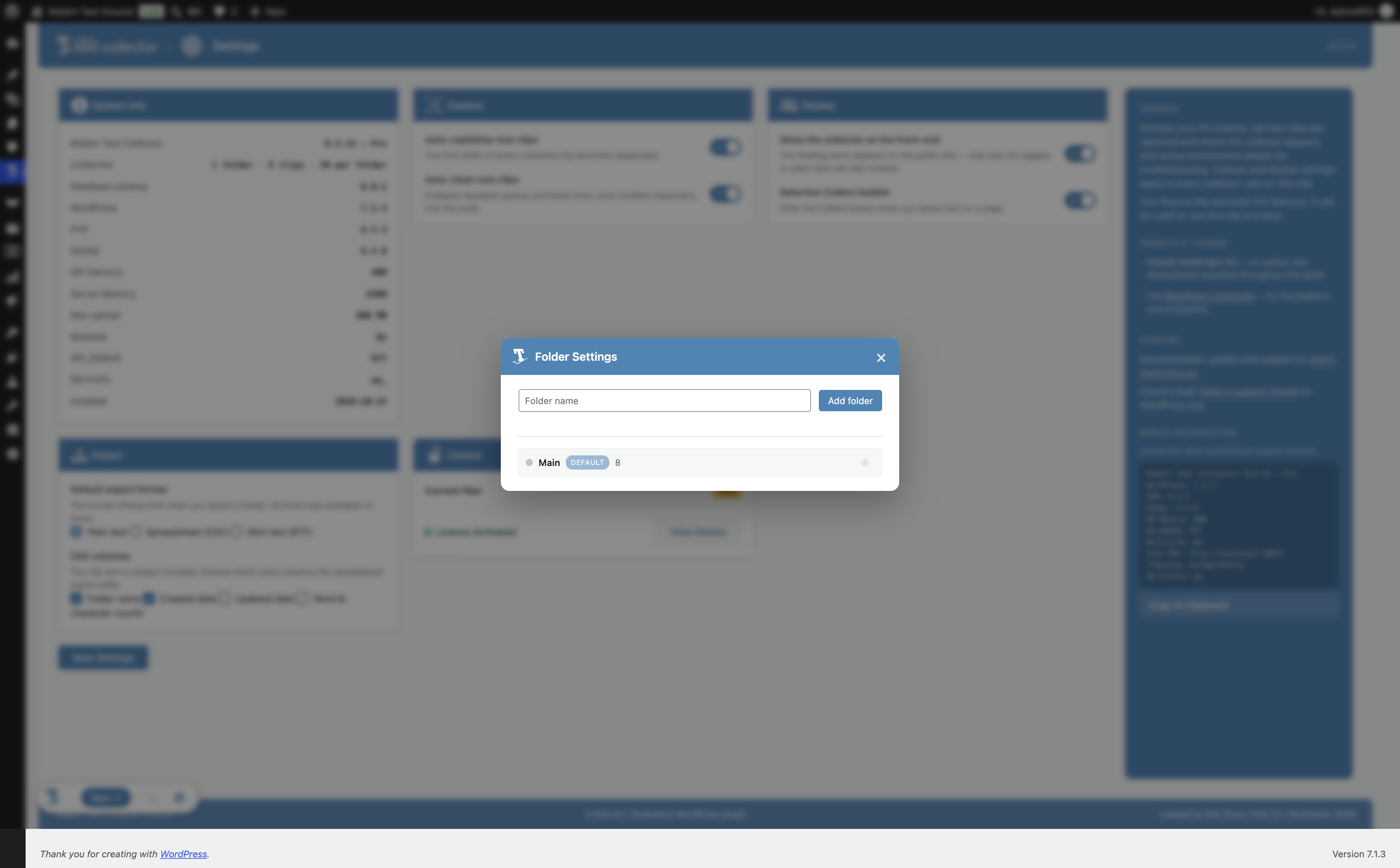
- New: adding a folder now opens a small in-page dialog instead of the browser’s plain prompt box — cancelling it leaves your current folder exactly as it was.
- Improved: every confirmation and message across the folder page and the floating panel — deleting a clip or folder, merging, emptying — now uses the plugin’s own themed dialog rather than the browser’s grey pop-up, for a consistent, calmer feel.
- Fixed: clicking the „+“ to add a folder no longer briefly blanks the current folder’s list behind the dialog.
- Improved: the selection Collect bubble now stays out of the way of sibling RobArt plugins‘ screens, so it only appears where there’s text of yours to collect.
- Under the hood: groundwork for a forthcoming Pro „Live Text“ feature (select and collect text from inside images). Not yet enabled.
0.1.0
- New: search and filter your clips right from the folder’s header bar (Pro).
- New: export a whole folder as a spreadsheet (CSV) or rich text (RTF) from a hover menu on the folder’s save button, with a choice of columns (Pro). Plain-text export stays free.
- New: an Export card in Settings to pick your default export format and CSV columns.
- Licence: the Free plugin no longer shows a licence-key field or activation controls at all — the Licence card simply shows your plan and an upgrade link. All licence entry and activation now lives only in the Pro add-on, matching the rest of the range.
- Improved: the upgrade screen now shows clear one-time pricing (your purchase includes every version 1.x update) with a per-site seat choice.
- Improved: licence checks are more robust — switching your site between http and https, or a trailing-slash change, no longer risks dropping a valid licence.
- Fixed: the clip search box no longer showed a duplicate clear button, and its placeholder text no longer crowded the magnifier icon.
0.0.5
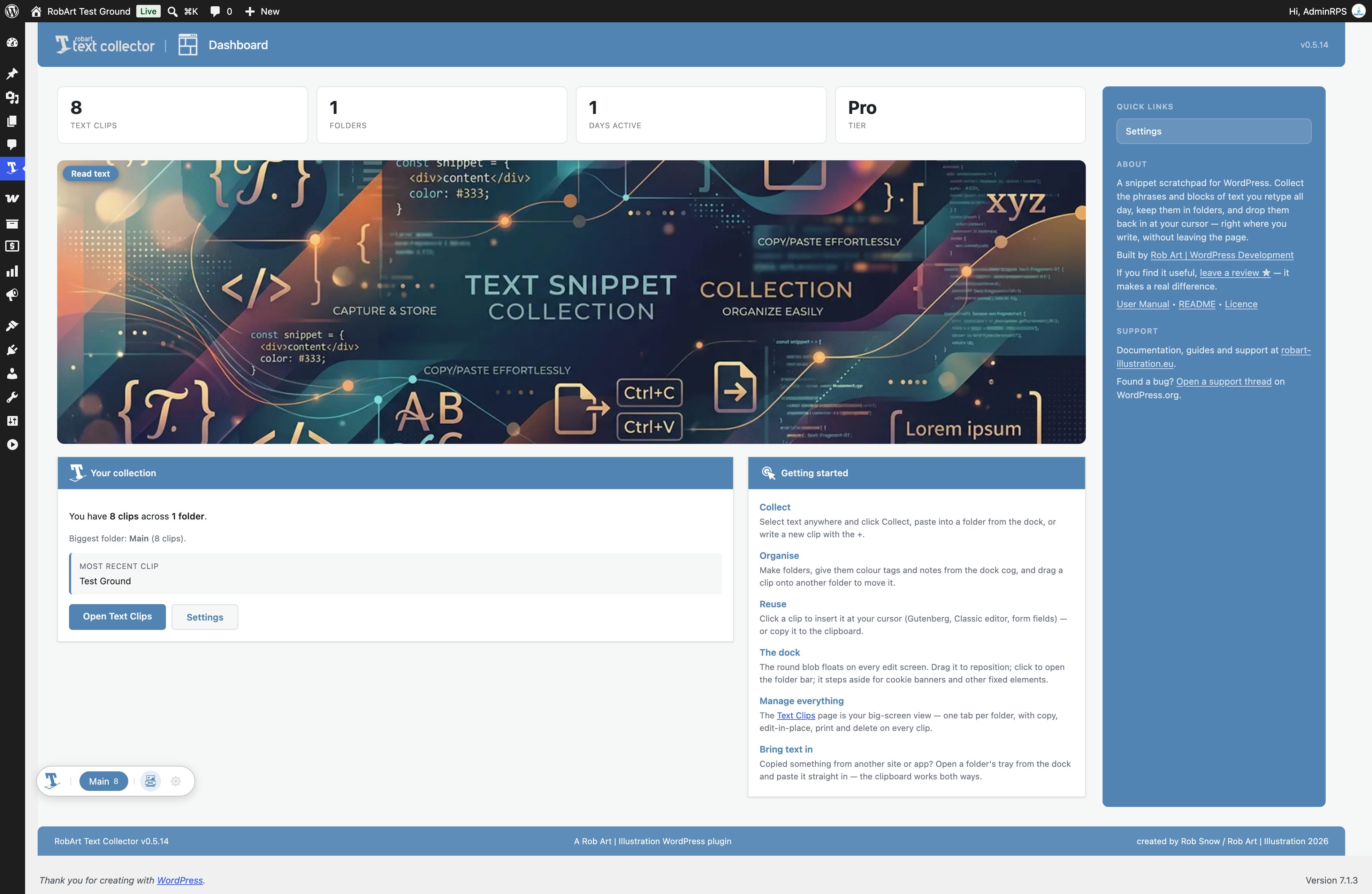
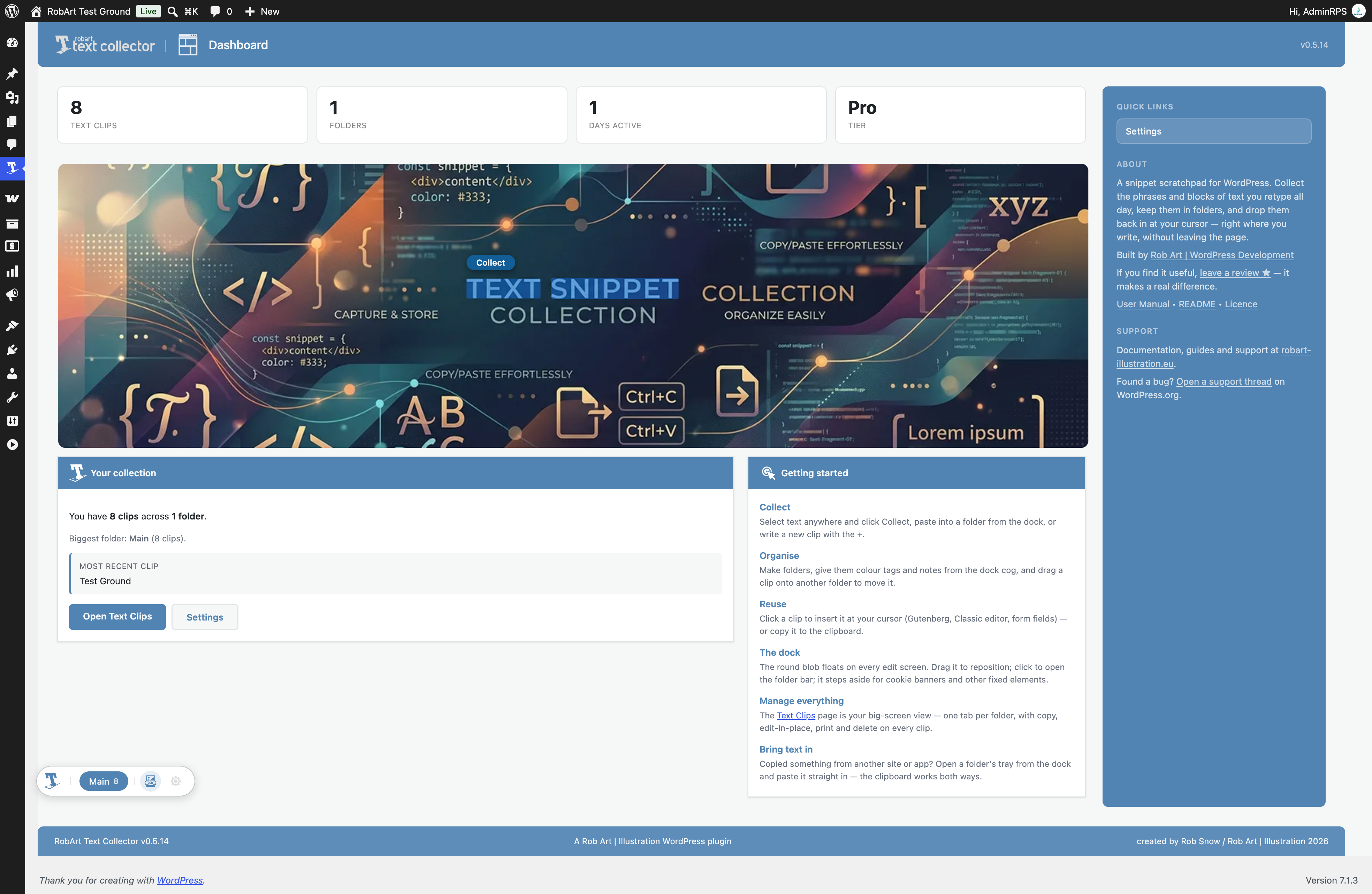
- New inviting Dashboard: real stats (that update live as you add or delete clips), a hero banner, a first-run welcome, an at-a-glance summary of your collection, and a Getting Started guide.
- The plugin menu is now visible to editors, not just administrators – the people who actually collect text can reach their clips.
- Menu renamed to „Text Collector“; the plugin logo now appears in the page header and on the welcome screen.
- Fixed: the „folder is full“ message on the Free tier now stays on screen long enough to read (it flashed by before).
0.0.4
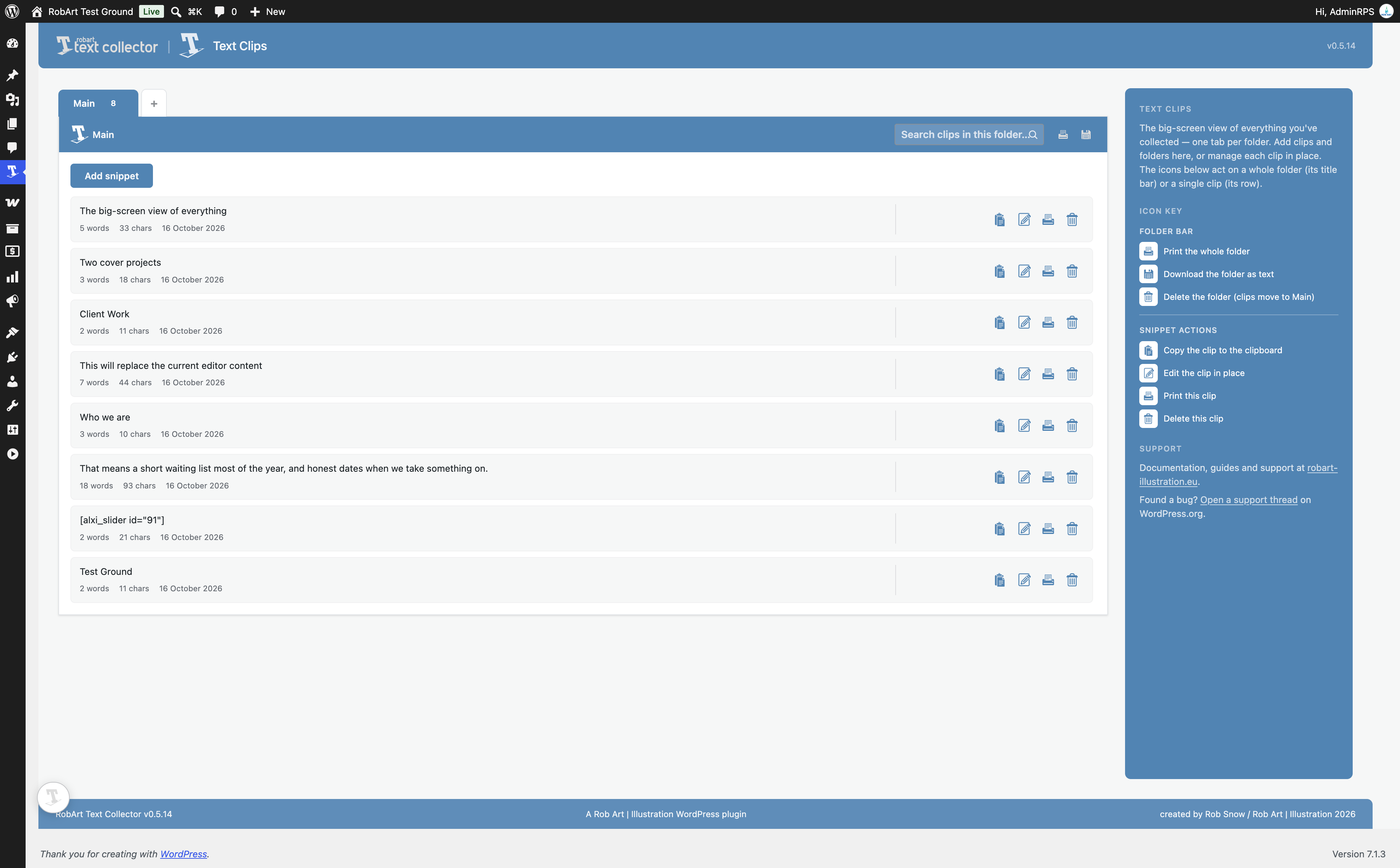
- Text Clips page is now a full management surface: add snippets and folders right on the page, plus per-clip mini-widgets (copy, edit in place, print, delete) and folder actions on the title bar (print, download, delete).
- Snippet tray gains a „new clip“ compose button alongside paste — write a clip straight into the open folder.
- Move a clip to another folder by pressing, holding, and dragging it onto a folder chip.
- Reorder folders and (Pro) reorder clips within a folder by Alt+dragging.
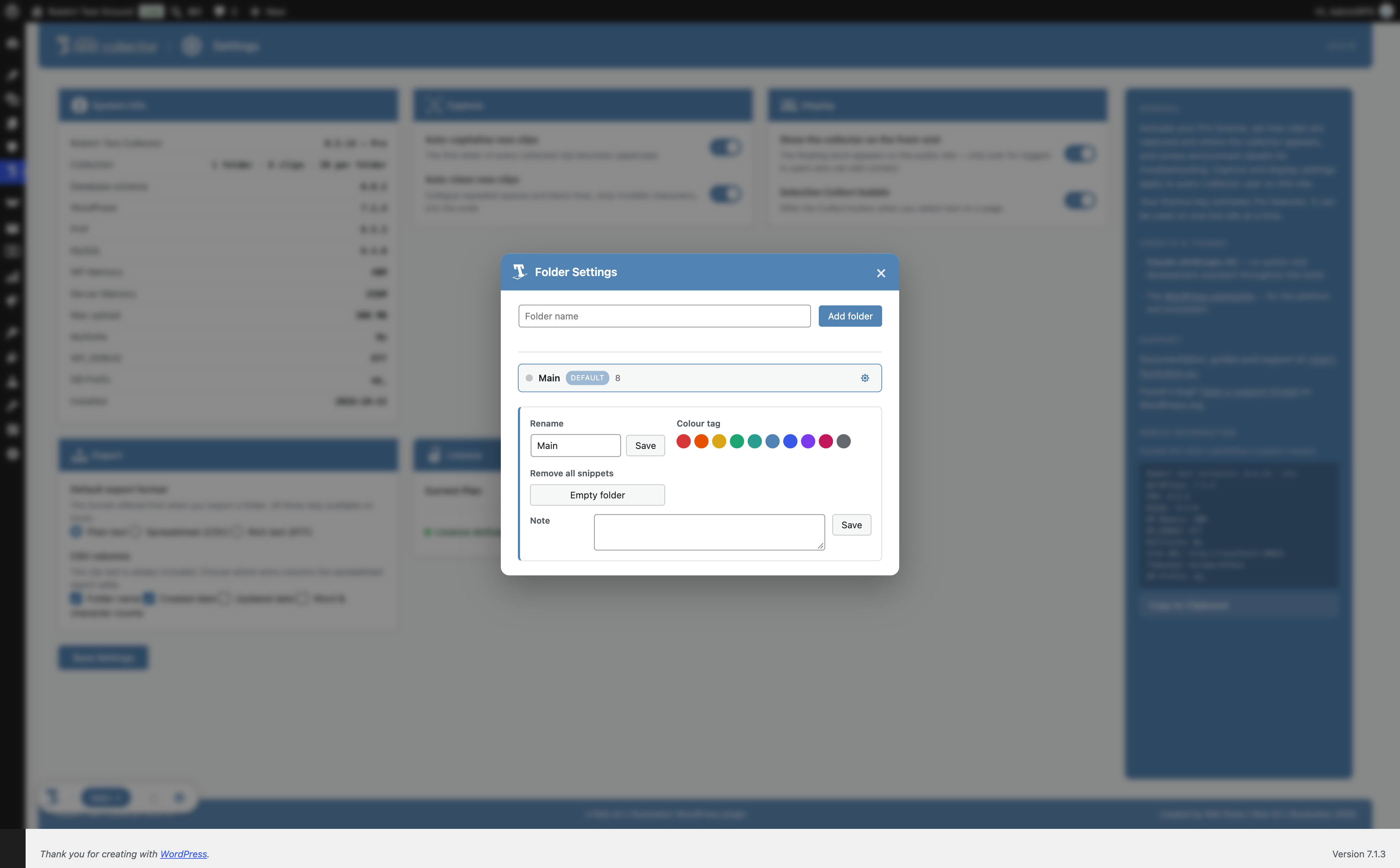
- Per-folder settings overlay reworked: rename, colour tag, merge into another folder, empty folder, note, and delete — the panel opens right under the folder you clicked.
- Snippet capacity per folder (5 on Free, 20 on Pro), with a friendly message when a folder is full.
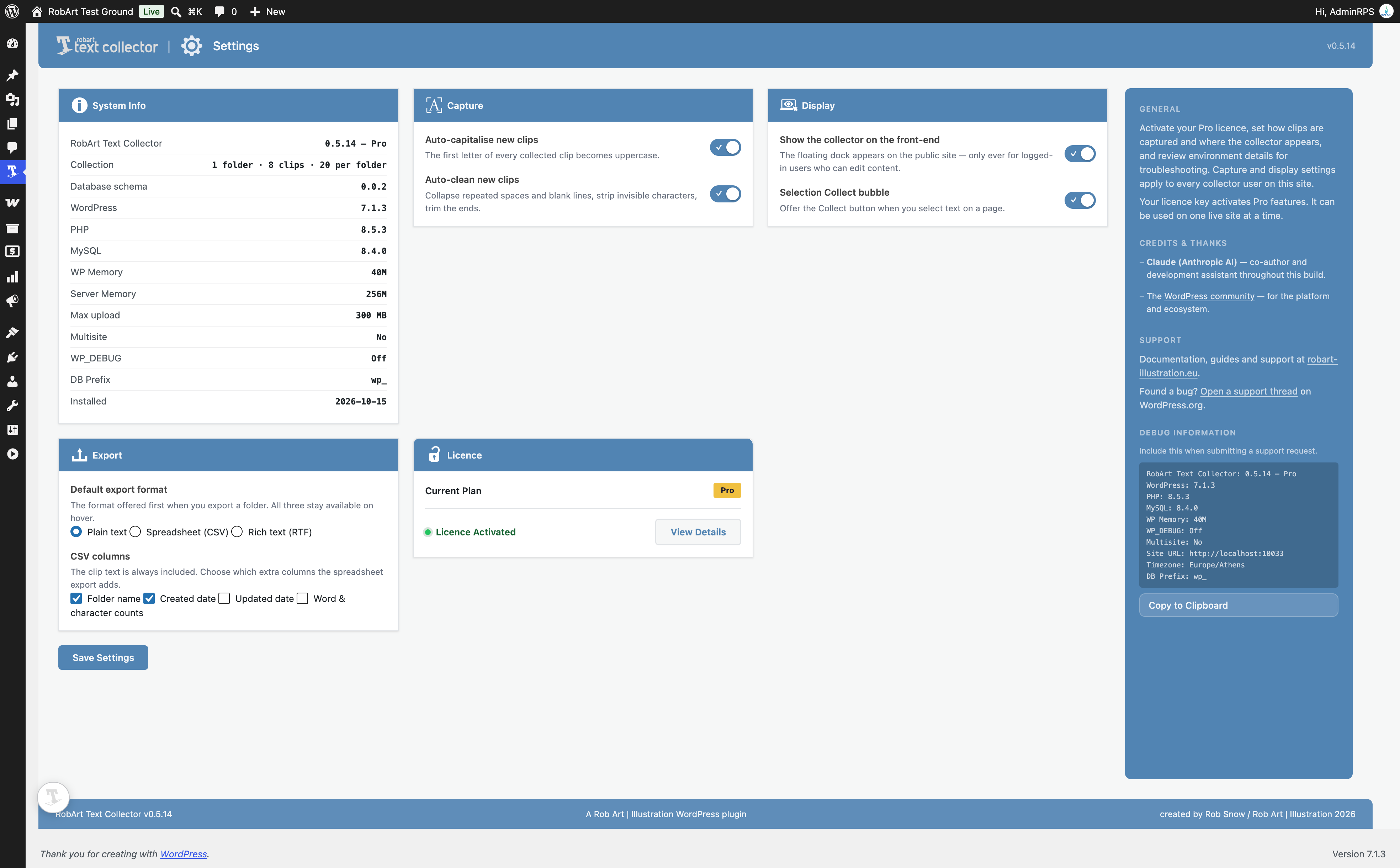
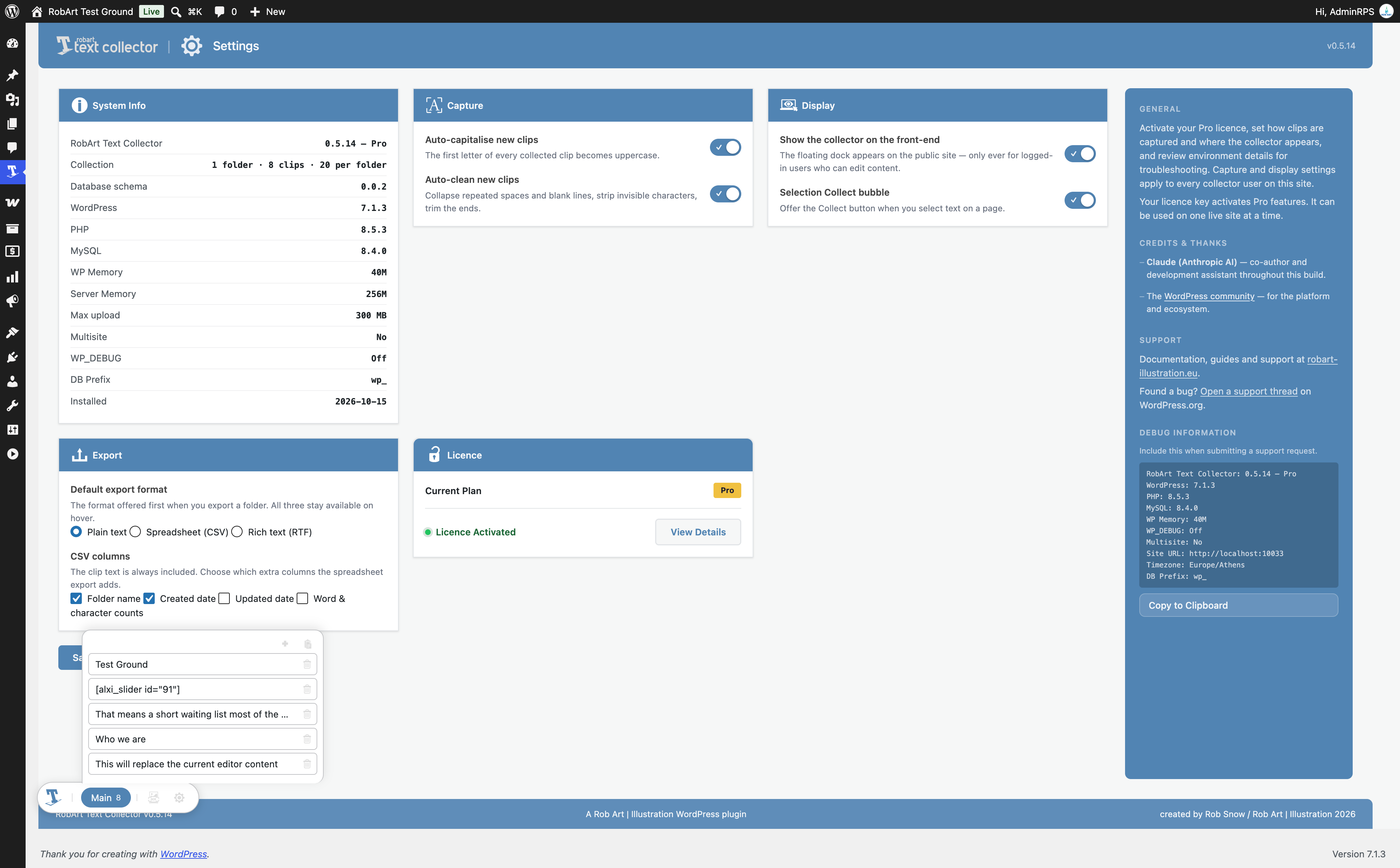
- Settings page rebuilt as a single page of cards: System Info, Capture (auto-capitalise / auto-clean new clips), Display (front-end dock and Collect bubble toggles), and Licence.
- The floating dock now steps aside if another fixed element (like a cookie banner) sits where it wants to be.
- New plugin menu icon.
0.0.3
- Insert-at-cursor: clicking a clip in the tray now pastes it exactly at your editing cursor (fields, TinyMCE / Classic editor, block editor); copies to the clipboard when no cursor is active. The dock no longer steals focus, so your caret survives the whole journey.
- Collect bubble now works inside the Classic editor (TinyMCE) – selections in editor frames are captured and the bubble positions correctly over them.
- Text Clips page updates live: captures landing while the page is open appear in the list and tab counts immediately.
- Fixed: the Collect bubble now reliably disappears on deselection and one second after „Collected“.
- Refreshed plugin icon artwork throughout the collector.
0.0.2
- Floating collector dock: a round blob that opens into a folder bar which grows with your folders (chips with live clip counts and colour dots).
- Default Main folder per user – every clip starts there; it cannot be deleted.
- Folder Settings overlay: create, rename and delete folders, plus a per-folder settings panel with colour tags, a note field and a danger zone.
- Snippet tray on every folder chip: paste clips in straight from the clipboard, click a clip to copy it back out, bin to delete. Newest on top, scrolls after five.
- Collect bubble: select text anywhere in WordPress and save it to the active folder in one click.
- Text Clips admin page with one live tab per folder, mirroring the dock.
- Per-user folder and snippet storage with derived word/character counts.
0.0.1
- Initial scaffold.