
Descripziun
BTW Carousel for WooCommerce is a lightweight, purpose-built product carousel for any WooCommerce store. Point it at a product category or tag and it builds a large hero stage image with a scrollable thumbnail strip underneath — no manual curation required, and no jQuery or heavy slider library weighing down your site.
Most carousel plugins force one layout to awkwardly stretch across desktop and mobile. BTW Carousel builds them separately from the ground up, so each device gets a layout actually tuned for it — swipe gestures and touch-pause on mobile, hover-pause and arrow navigation on desktop.
What makes v1.0.0 different
Earlier carousel plugins on the market either require jQuery, force a single one-size-fits-all layout, or lock basic features behind a paid tier. BTW Carousel for WooCommerce ships with none of those trade-offs: plain JavaScript only, genuinely separate desktop/mobile rendering, and every feature below fully usable for free.
Key features
- Query mode: pulls products automatically from a chosen category or tag, sorted by date, price, or popularity — no manual picking of products required
- Separate, purpose-built desktop and mobile layouts, each tuned for its device rather than one layout squeezed to fit both
- No jQuery and no heavy slider library dependency — small footprint, built with plain JavaScript
- Autoplay with hover-pause (desktop) and touch-pause (mobile), plus a dwell period after a manual selection before autoplay resumes
- Swipe gesture support on the mobile stage image, in addition to the scrollable thumbnail strip
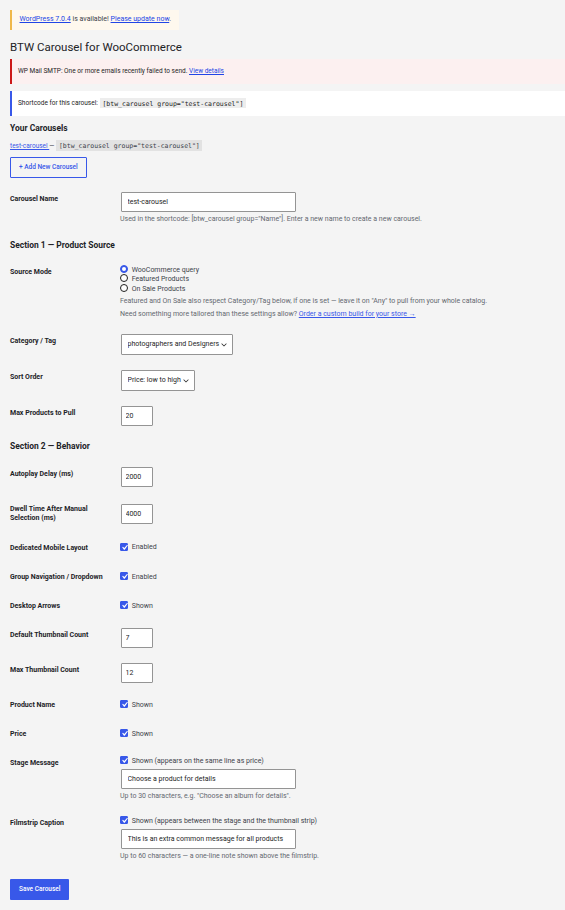
- Configurable display: show or hide the product name and price; an optional short message shown beside the price; an optional caption shown above the thumbnail strip
- Multiple independent carousels per site, each with its own shortcode:
[btw_carousel group="Your Carousel Name"] - Responsive breakpoints for laptop, tablet, and mobile widths
- Optional manually-entered products — add your own product tiles alongside or instead of a queried product list, each with its own name, link, and price text
Requirements
BTW Carousel for WooCommerce requires WooCommerce to be installed and active.
Maletgs dal visur



Installaziun
- Upload the
btw-carousel-corefolder to/wp-content/plugins/, or install directly through the WordPress Plugins screen. - Activate the plugin through the „Plugins“ menu in WordPress.
- Go to the „BTW Carousel“ menu item in your WordPress admin sidebar.
- Click „+ Add New Carousel“, give it a name, choose a product category and behavior settings, and save.
- Copy the shortcode shown for that carousel (e.g.
[btw_carousel group="Your Carousel Name"]) and place it on any page or post.
FAQ
-
Does this require WooCommerce?
-
Yes. BTW Carousel for WooCommerce will not activate unless WooCommerce is installed and active.
-
Can I have more than one carousel on my site?
-
Yes. Each carousel has its own name and its own shortcode, so you can create as many independent carousels as you like, each with different products and settings.
-
Does it work inside Elementor, Divi, or other page builders?
-
Yes. The shortcode can be placed inside a page builder’s HTML or Shortcode widget.
-
My caching plugin is showing an old version of my carousel after I changed a setting.
-
If you use LiteSpeed Cache, saving a carousel’s settings automatically purges the site cache so your change appears immediately. If you use a different caching plugin, you may need to manually clear its cache after changing carousel settings.
-
Can I get a custom version built for my store?
-
Yes. If you need something beyond what this plugin’s settings support — a different layout, extra data sources, or deeper integration with your store — visit https://blacktiewms.com to order a custom build.
Reviews
There are no reviews for this plugin.
Contributors & Developers
“BTW Carousel for WooCommerce” is open source software. The following people have contributed to this plugin.
Contributors
Translate “BTW Carousel for WooCommerce” into your language.
Interested in development?
Browse the code, check out the SVN repository, or subscribe to the development log by RSS.
Changelog
1.1.0
- Added optional Manual Products: add your own product tiles alongside or instead of a queried product list, each with its own name, link, price text, and an active/inactive toggle.
- Removed the group navigation dropdown from the front end and admin settings.
- Fixed mobile carousel stage image cropping on some devices by switching to aspect-ratio based sizing.
- Fixed mobile carousel thumbnail strip overlapping page content directly below it.
- Fixed manual products not appearing in the mobile thumbnail strip once the catalog product count reached the Max Thumbnail Count setting.
- Mobile thumbnails now use the same optimized image size as desktop, reducing page weight on mobile.
1.0.1
- Fixed the mobile carousel stage not displaying its background image.
- Fixed a CSS syntax issue in the desktop stylesheet.
1.0.0
- Initial release.