

Descripziun
Connect Claude, ChatGPT and other AI agents to WordPress with a free WordPress MCP server. Say it in plain words, and the AI does it on your site.
AlphaBridge MCP lets the Claude or ChatGPT you already use work directly on your WordPress site: write and schedule posts, upload images, answer comments, edit menus and widgets, check and fix SEO fields, change prices and stock in WooCommerce, manage user accounts, read pending updates and site health, and undo a change with one sentence. No account, no API key, no credits, connected in about two minutes. Rated A by Glama, with the highest score of all WordPress MCP servers with 40 or more tools.
Try it:
- „Write a post from these notes and schedule it for Friday.“
- „Approve the new comments and answer the question about opening hours.“
- „Write a meta description for every post that has none.“
- „Add alt texts to the images in the media library that have none.“
- „Which of my sites have updates waiting?“
- „Show me the texts and buttons on the home page, in page order.“
- „Put the About page back the way it was before your last change.“
Watch the whole setup in one minute: Connect Claude to WordPress in five steps. Or click Live Preview on this page and look around the plugin on a test site.
What is a WordPress MCP server?
MCP, the Model Context Protocol, is the open standard AI assistants use to work with other software. An MCP server offers tools that an assistant can call. AlphaBridge MCP turns your WordPress site into such a server. Claude, ChatGPT, Claude Code, Cursor and other MCP clients see its tools, and when you ask for something, the assistant picks the right tool and runs it on your site, with the rights of your WordPress user.
You need nothing else for it: no WordPress MCP Adapter, no extra plugin, no service to sign up for. AlphaBridge speaks MCP itself, in plain PHP inside WordPress. It manages widgets and site settings, changes the texts of pages built with blocks or a common page builder, and works in the SEO fields of Yoast SEO and Rank Math.
82 tools. No license key, no registration, no quotas. The free plugin is complete, not a trial.
Why AlphaBridge MCP
- Free and complete. Every free tool works without payment, registration or license key, and the plugin does not expire. No usage quotas and no credits: you use Claude or ChatGPT as you do today.
- Connect straight from Claude’s directory. In Claude, pick AlphaBridge from its connector directory, enter your site’s address and approve on your own site.
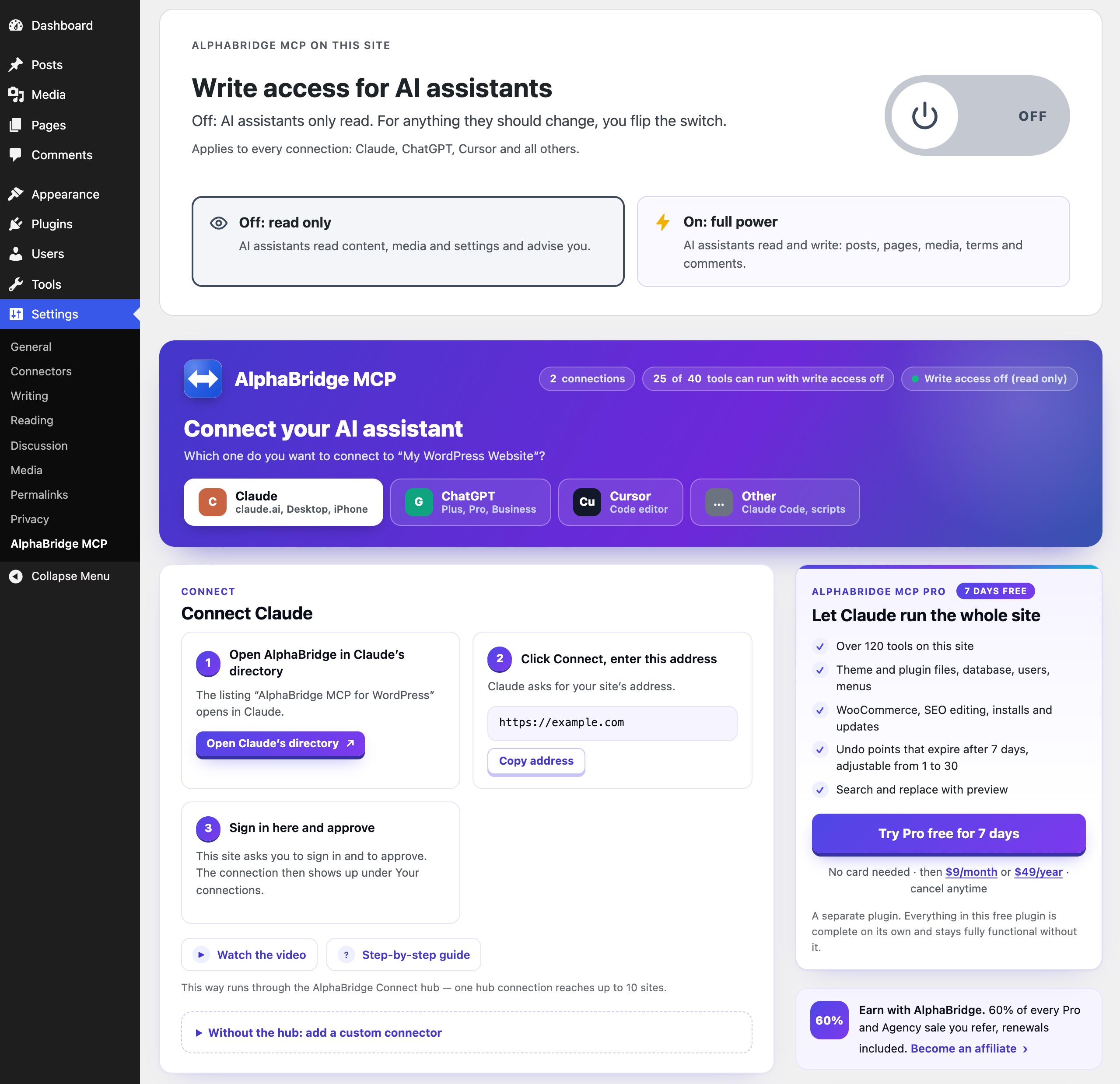
- It reads until you allow more. Out of the box the AI only reads. One switch lets it write, one click turns writing off again.
- Undo included. Edits of posts and pages, page-builder elements, status changes in bulk, the site settings and the options a search and replace changed leave an undo point that expires after 7 days. One sentence brings back what was there before.
- Your WordPress rights apply. Every connection acts as a real WordPress user. What that user may not do, the AI cannot do.
- Edits Elementor and 14 more page builders. The AI changes texts, links and images right in the builder, with a preview first and an undo point.
- Up to 10 sites in one chat. The free hub, the service of AlphaBridge MCP that links your sites to Claude and ChatGPT, brings up to 10 WordPress sites into one chat, in every edition.
- Runs on shared hosting. Plain PHP over the WordPress REST API, with nothing else to install on the server.
Who it is for
- Site owners. You look after the site of your practice, shop, club or blog yourself. Now you tell Claude or ChatGPT what should change, and it happens on your site, without copying texts between tabs.
- Freelancers and agencies. Bring up to 10 client sites into one chat and hand routine changes to the AI, while every site keeps its own login and rights. Agency adds Site Deploy for relaunches.
- Developers. Work from Claude Code, Cursor or Codex on a live site, inside the WordPress rights model you already know.
Connect Claude to WordPress
- Install AlphaBridge MCP from Plugins Add New Plugin and activate it.
- Open AlphaBridge MCP for WordPress in Claude’s connector directory and click Connect.
- Enter your site’s address and approve on your own site’s login-protected consent screen.
Claude asks only for your site’s address. It then works on your site in the browser, in the desktop app and on the phone. To connect without the hub, add your site’s MCP address as a custom connector instead.
Connect ChatGPT to WordPress
ChatGPT on Plus, Pro, Business, Enterprise and Edu adds your site as a plugin:
- In ChatGPT, open Plugins, choose Add, then add a custom MCP server.
- Paste your site’s MCP address from Settings AlphaBridge MCP as the server URL and choose OAuth.
- Approve on your own site.
The plugin’s settings page walks you through the same steps and checks that ChatGPT can sign in.
Connect Claude Code, Cursor, Codex and other MCP clients
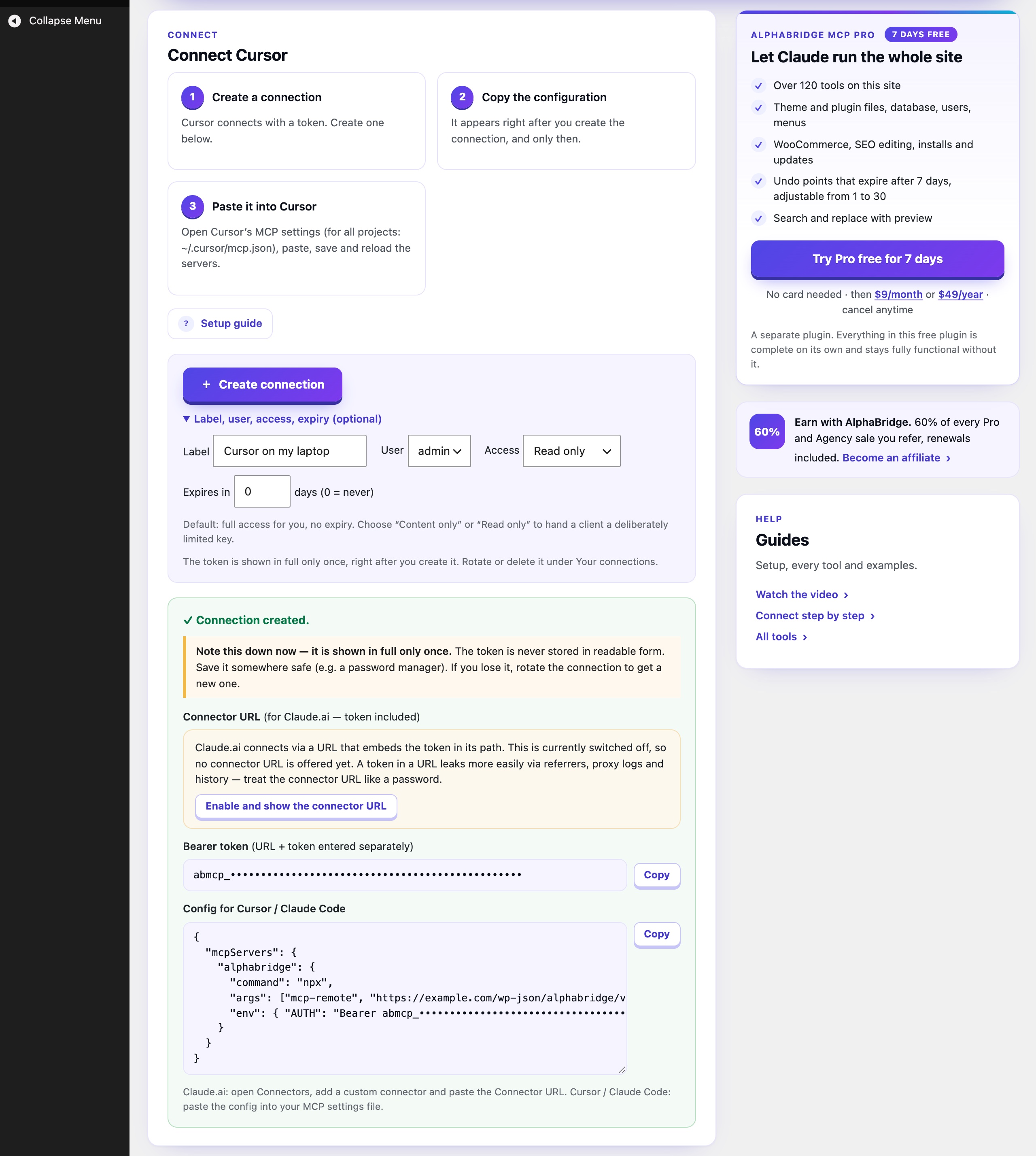
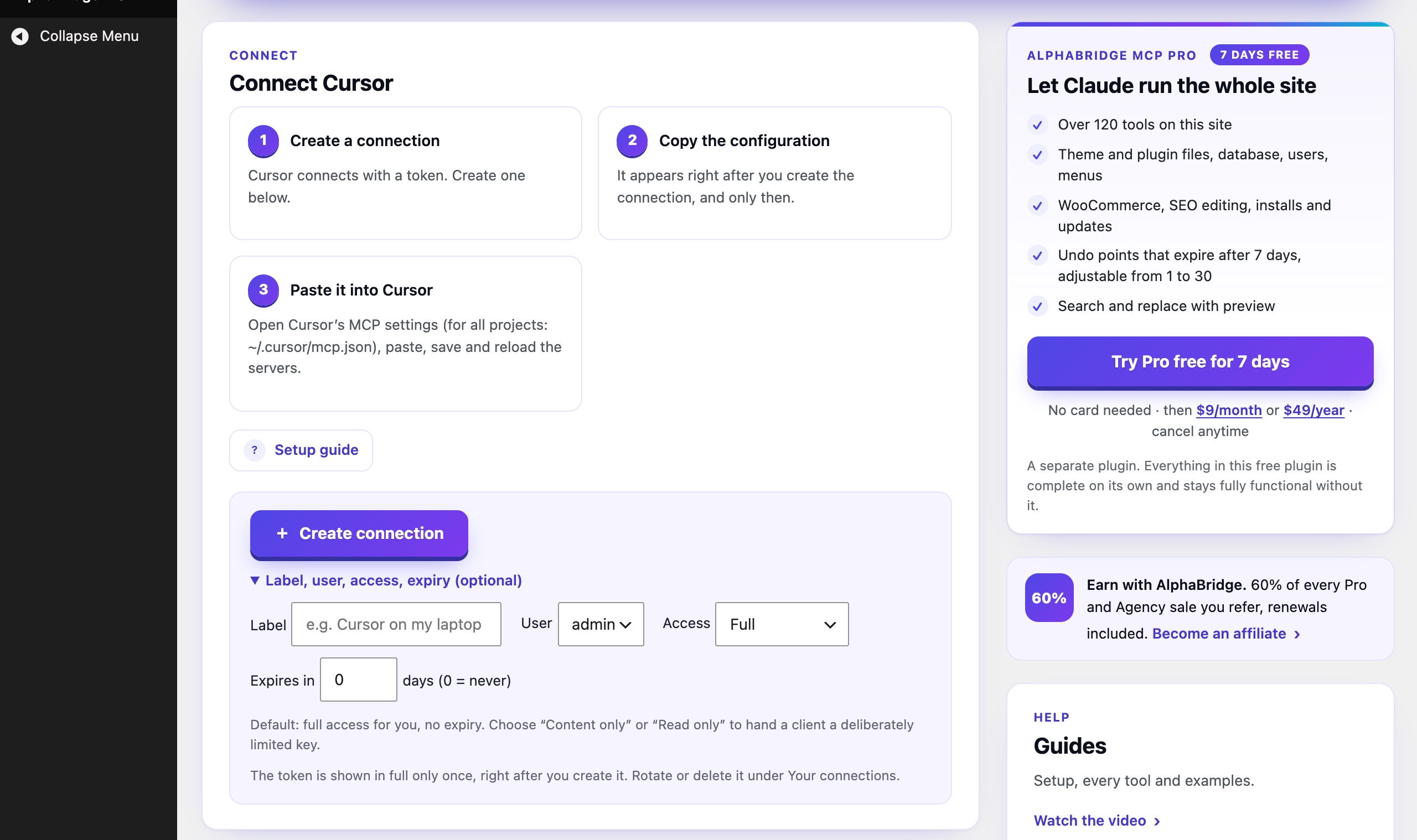
Clients that sign in with OAuth need only your site’s MCP address. For the others, create a connection under Settings AlphaBridge MCP: Cursor gets a ready-made config, Claude Code a ready-made command, and every other client the address and a key for this one connection. This works for Claude Code, Cursor, Codex, VS Code, Windsurf and your own scripts. Each connection gets full access, content only or read only, and a connection you create in the plugin can also get an expiry.
What your AI can do with the free plugin
- Posts and pages. Write, edit, schedule, duplicate and delete posts and pages, set their custom fields and bring back an earlier revision. Publish, unpublish or trash up to 500 at once. Search the whole site.
- Undo. Changes to the title, content, excerpt, status, slug, parent, author or date of a post, page-builder elements, status changes in bulk, changes of the site settings and the option rows a search and replace changed leave an undo point that expires after 7 days. Ask the AI what it changed, and one sentence puts the previous values back. Custom fields and terms are not part of it.
- Media. Add JPEG, PNG, GIF, WebP and PDF files from the chat or from a web address. Change titles, captions and alt texts, and delete files.
- Categories and tags. Create, rename and delete the terms of any taxonomy.
- Comments. Read, approve, answer and delete comments, and move spam out of the way.
- SEO. Read and set the SEO title, meta description and focus keyword that Yoast SEO or Rank Math keep for each post, and find what is missing.
- Updates and site health. See which plugins, themes and WordPress versions wait for an update, and how the site is doing.
- Page builders. Read the pages of supported builders as an outline, and change the text, link or image of one element right in the builder, with a preview first and an undo point.
- Search and replace. Replace a text across posts, custom fields, options and terms, safe for serialized and JSON data: a dry run first, then apply. On page-builder pages only the fields the builder’s writer may change are touched (
scopetext); matches in code or other locked places are counted inlocked_matches.post_idskeeps a run to the posts you name,expected_countwrites only if the preview still fits, and changed options get an undo point. - Menus. Read the navigation menus, create a menu, and add or remove its items.
- Shop. Read WooCommerce orders, products, coupons and customers. Change prices, sale prices, stock and order status, and create coupons.
- Users. Create, change and delete user accounts and give them roles, within the rights of your own account; the last administrator always stays. Set user and term meta.
- Plugins and themes. See which plugins and themes are installed and active.
- Maintenance. Clear the object cache and the page cache of common caching plugins, refresh the permalinks, optimise the database tables and remove expired transients. See the scheduled WP-Cron events, and with write access on read the latest lines of debug.log.
- Widgets and settings. Add, change and remove widgets, and set the site title, tagline, admin email, timezone and posts per page.
- Site audits. Ask for a check of all posts: thin content, missing meta descriptions, images without alt text. The AI works through the list with you.
- Many sites. Bring up to 10 sites into one chat and work on whichever you name.
Page builders it reads
It reads a page as an outline: its elements in page order, with their visible texts, links and images. Elements it cannot read safely, such as code or forms, are listed as locked, without their content.
- Read: WordPress blocks, Elementor, Beaver Builder, SiteOrigin Page Builder, SeedProd, GenerateBlocks, Kadence Blocks, Spectra, Stackable, Pagelayer, Otter Blocks and CoBlocks (both as plain blocks), WPBakery Page Builder, Divi 4, Avada (Fusion Builder), Flatsome (UX Builder) and Enfold (Avia Layout Builder).
- Read according to the vendors‘ documentation: WPBakery Page Builder, Divi 4, Avada, Flatsome and Enfold.
- Recognised, not read: Brizy, Themify Builder, Zion Builder, Live Composer, Cornerstone, Thrive Architect, Bricks, Breakdance, Oxygen 6, Oxygen Classic, BeTheme (BeBuilder), Visual Composer Website Builder, Divi 5 and Etch.
Where a builder shows its own data and the WordPress content is only a copy, as with Elementor, Beaver Builder, SiteOrigin Page Builder and Enfold, the plugin leaves that copy alone while the builder is active, because a change there would not show, and says how to change the page instead. The AI changes texts, links and images right in the builder, with a preview first and an undo point, on pages of the WordPress blocks, GenerateBlocks, Kadence Blocks, Spectra, Stackable, Pagelayer, Elementor, Beaver Builder, SiteOrigin Page Builder, SeedProd, WPBakery Page Builder, Divi 4, Avada, Flatsome and Enfold.
You stay in control
- Read-only until you switch it on. Out of the box the AI can only read. One switch, „Write access for AI assistants“, lets it create, change and delete. One click turns it off again.
- Your WordPress rights apply. Every connection acts as a real WordPress user. What that user may not do, the AI cannot do.
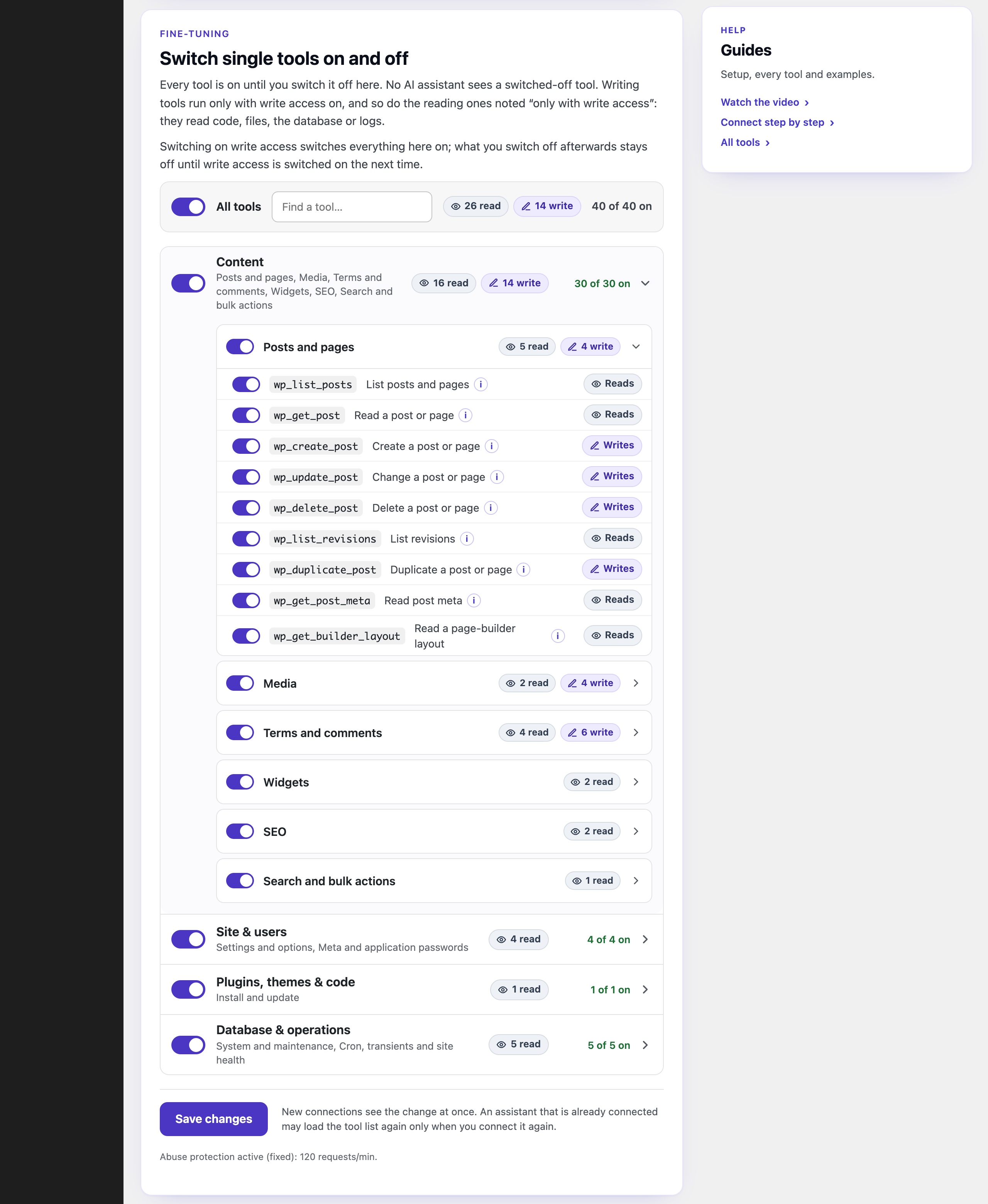
- Rules per connection. Give each app full access, content only or read only. A connection you create in the plugin can also get an expiry. Switching write access on turns every tool on. Each connection keeps its access level. Single tools or whole groups can be switched off.
- A clear log. The plugin keeps the latest 200 tool calls with time and status, and the settings page shows the newest. A limit of 120 requests a minute stops runaway request bursts.
- Answers that help. When AlphaBridge refuses a request, it says why and what to do next.
- No telemetry. The plugin sends no telemetry and contacts no outside service on its own.
Works with
- AI apps: Claude in the browser, the desktop app and on the phone, ChatGPT from Plus upwards, Claude Code, Cursor, Codex, VS Code, Windsurf and other MCP clients.
- SEO plugins: Yoast SEO and Rank Math. All in One SEO is recognised.
- Page builders: Elementor, Beaver Builder, SiteOrigin Page Builder, SeedProd, the block editor and the others listed above.
- Hosting: any WordPress host with PHP 8.0 or newer, shared hosting included. HTTPS is recommended.
More with Pro
AlphaBridge MCP Pro is a separate add-on. Everything in the free plugin plus the Pro tools, 135 tools on your site:
- Code with a safety net. Edit theme and plugin files and PHP snippets. After each edit of active PHP code, Pro tests the site and puts the old version back if the test finds a fatal PHP error.
- Undo for files and code. Theme and plugin files, PHP snippets, options and theme switches come back with one sentence too; undo points expire after 7 days by default, adjustable from 1 to 30 days.
- Plugins, themes and WordPress itself. Install, update, activate and delete plugins and themes, and update WordPress. Test requests check the site before and after an update or a switch-on, and a version that breaks it is put back in the same call.
- Database and options. Query the database, change rows of plugin tables with structured statements, and write options, with guards for what must stay protected.
- Your other plugins. Run the abilities your other plugins offer the AI.
The Agency plan adds Site Deploy: the AI publishes files, themes and whole builds over SFTP onto the server the site runs on. Agency covers up to 10 sites.
Pro can be tried free for 7 days, no card needed. The free plugin stays complete without it. Editions, guides and a comparison with other WordPress MCP plugins: alphabridge-mcp.com
Claude, ChatGPT and the other names mentioned belong to their respective owners. Naming them does not mean they partner with, sponsor or endorse AlphaBridge.
External services
AlphaBridge MCP sends no telemetry and calls no outside service on its own. Three things reach beyond your site, each only when you start them:
- The hub, optional. If you connect through the hub at connect.alphabridge-mcp.com, the free service of AlphaBridge MCP that links your sites to Claude and ChatGPT, it calls your site to set up the connection and to pass on the tool calls you make. It keeps your site’s access key encrypted and passes content through without storing it. Terms and privacy notice.
- The app you connect. Some apps, such as ChatGPT, identify themselves with a small public file. While you approve such an app on your site, your site fetches that file from the app’s address. The request carries no content, cookies or tokens from your site. You can switch this off under ChatGPT „Switch the direct sign-in off“ on the plugin’s settings page.
- A file you name. The tool wp_upload_media_from_url downloads the file at the URL you give it.
Maletgs dal visur


Installaziun
- In WordPress, go to Plugins Add New Plugin, search for „AlphaBridge MCP“, install and activate it.
- Claude: open AlphaBridge MCP for WordPress in Claude’s directory and click Connect. Enter your site’s address and approve on your own site’s login-protected consent screen. There is no endpoint or token to copy. To connect without the hub, add your endpoint as a custom connector instead.
- ChatGPT: open Plugins, choose Add, then add a custom MCP server. Paste your site’s MCP address from Settings AlphaBridge MCP as the server URL, choose OAuth and approve on your site.
- Cursor, Claude Code and other clients: under Settings AlphaBridge MCP, create a connection. Cursor gets a ready-made config and Claude Code a ready-made command.
- Assistants only read until you allow more. To let them create, change and delete, and read user profile fields and the error log, switch on „Write access for AI assistants“ at the top of Settings AlphaBridge MCP. Changes then take effect immediately and not everything can be undone. You switch it on at your own risk, so keep a current backup. Switching it on asks you to agree to the Terms of Use.
FAQ
-
Is it really free?
-
Yes. All its tools work without payment, registration or license key, and the plugin does not expire. There are no usage quotas, only a limit of 120 requests a minute that protects your server. You need no API key or AI credits either: AlphaBridge has no AI of its own, and you use Claude or ChatGPT as you do today.
-
Is it secure?
-
Yes, and it starts read-only. Until an administrator switches on write access, every tool that creates, changes or deletes is refused, and so are the readers of user profile fields and of the error log. Each connection acts as a real WordPress user: what that user may not do, the AI cannot do. It cannot read arbitrary site options, only a fixed list of common settings and the settings of the site’s widgets; search and replace names only the options it would change, and never touches protected ones. The latest 200 calls are logged.
-
What if the AI gets something wrong?
-
Ask it to undo. Edits of posts and pages, page-builder elements, status changes in bulk, the site settings and the options a search and replace changed leave an undo point that expires after 7 days, and one sentence brings the previous state back. Deleted posts and pages go to the trash by default, and WordPress keeps the revisions of edited posts as usual. Write access switches off again with one click. Keep a current backup all the same. Pro adds undo points for theme and plugin files, PHP snippets and options, and lets you set how long they last, from 1 to 30 days.
-
Which AI apps work with it?
-
Claude in the browser, the desktop app and on the phone, ChatGPT from Plus upwards, Claude Code, Cursor, Codex, VS Code, Windsurf and any other client that speaks MCP. Claude connects from its connector directory, ChatGPT as a plugin with OAuth, the others with OAuth or a connection you create in the plugin.
-
Do I need the WordPress MCP Adapter?
-
No. AlphaBridge is its own MCP server with its own tools, so it works without the adapter and without the Abilities API. With Pro, the AI can also run the abilities that your other plugins register.
-
Does it work with WooCommerce, Elementor, Yoast and Rank Math?
-
Yes. The free plugin reads Elementor pages and the pages of many other page builders and changes their texts, links and images, reads and sets the SEO title, meta description and focus keyword of Yoast SEO and Rank Math, reads the orders, products, coupons and customers of WooCommerce, and changes prices, stock and order status and creates coupons.
-
Can I limit what the AI may do?
-
Yes. Each connection gets full access, content only or read only and acts as the WordPress user you choose. A connection you create in the plugin can also get an expiry. Single tools or whole groups can be switched off, and the main switch turns all writing off with one click.
-
Do I need to know how to code?
-
No. You install the plugin like any other, connect your assistant from its own app and say what you need in plain words.
-
Can I manage several sites?
-
Yes. The free hub brings up to 10 WordPress sites into one Claude or ChatGPT chat, in every edition. Each site is approved on its own login and keeps its own rights, switch and log.
-
Yes. It runs inside WordPress, in plain PHP, over the WordPress REST API. There is nothing else to install on the server. It needs PHP 8.0 or newer, and HTTPS is recommended.
-
Sign-in ends with “Not Acceptable” or mentions Mod_Security
-
Some hosts run a firewall that refuses any request with a web address in the app’s ID, and some apps (ChatGPT, Codex) identify themselves with exactly such an address. The site checks this itself and, where the firewall blocks it, lets ChatGPT and Codex register with the site instead. Then:
- In the app, remove the connector for this site and add it again. The sign-in now goes through.
- If it still fails, add the connector once more, this time with this address instead of your site’s: https://connect.alphabridge-mcp.com/mcp. When you click Authenticate, the free AlphaBridge hub asks for your site’s address. Enter it and approve on your site as usual.
If the site did not notice the firewall (some let requests from the site’s own server pass), switch the direct sign-in off by hand: Settings AlphaBridge MCP ChatGPT „Switch the direct sign-in off“, then add the connector again.
-
A proxy has trouble with the newer MCP revision
-
The site answers apps in MCP revision 2026-07-28 and keeps the older revisions for apps that ask for them. If a proxy in front of the site cannot handle the newer one, a developer switches it off with
add_filter( 'ab_mcp_modern_protocol', '__return_false' );in a small plugin, or by settingmodern_protocolto false in the optionab_mcp_options; the site then answers in the older revisions only. -
Does the plugin send data anywhere?
-
No. It sends no telemetry and contacts no outside service on its own. The three cases you start yourself are listed under External services, at the end of the description.
-
Do I need Pro?
-
Not to get started. The free plugin covers content, page-builder texts, search and replace, media, comments, menus, widgets, users and your shop, with undo, on as many sites as you like. Take Pro for code with a safety net, installing and updating plugins and themes, and undo that also covers files, adjustable up to 30 days. Agency is for client sites: all tools and Site Deploy on up to 10 sites. Pro can be tried free for 7 days, no card needed: alphabridge-mcp.com
-
Is there an affiliate programme?
-
Yes. Recommend AlphaBridge and profit. As an affiliate you profit from every Pro and Agency purchase made through your link, renewals included, paid monthly in US dollars via PayPal. It is open worldwide to anyone over 18 who does not live in a country under a US embargo, customer or not: apply on https://alphabridge-mcp.com/affiliates, where you also find the terms, banners and ready-made texts. The commission comes from sales of the separately sold Pro and Agency editions. This free plugin itself earns none, and it works fully without joining.
-
How can I help?
-
A short review on WordPress.org helps other site owners find the plugin: write a review. Questions and problems are best placed in the support forum.
Reviews
There are no reviews for this plugin.
Contributors & Developers
“AlphaBridge MCP – WordPress MCP Server: Connect Claude, ChatGPT and AI Agents” is open source software. The following people have contributed to this plugin.
Contributors
Interested in development?
Browse the code, check out the SVN repository, or subscribe to the development log by RSS.
Changelog
4.10.0
- Page-builder texts and search and replace in the free plugin, 82 tools in all.
wp_update_builder_elementandwp_search_replacecame with AlphaBridge MCP Pro only; they work as they did there, with the same checks, and their messages come in the plugin’s languages. wp_update_builder_elementchanges the text, link or image of one element on pages of the WordPress blocks, GenerateBlocks, Kadence Blocks, Spectra, Stackable, Pagelayer, Elementor, Beaver Builder, SiteOrigin Page Builder, SeedProd, WPBakery Page Builder, Divi 4, Avada, Flatsome and Enfold. It previews by default; applied, it records an undo point first, saves through the builder and reads the page back.wp_search_replacereplaces across posts, postmeta, options and terms, safe for serialized and JSON values, with a dry run per table first. On page-builder pages (scopetext) only the fields the builder’s writer may change are touched, and matches in locked places are counted inlocked_matches;scoperaw replaces the stored data as text.- New:
post_idsandexpected_count.post_idskeeps a replace to the posts it names; withexpected_count, apply=true writes only when the call still finds as many matching rows as its dry run did. - New: undo for option rows. The option rows a replace changes get an undo point of their own (
options_undo_token), recorded before the first of them is written. - Undo for page-builder pages.
wp_undoputs every stored copy of a page back byte for byte and leaves a page changed since as it is, unlessforce=true. - Protected options (the site address, active plugins and theme, roles and registration, the mail server, keys, AlphaBridge’s own settings) stay out of every replace.
4.9.0
- 22 more tools in the free plugin, 80 in all, undo included. Until now they came with AlphaBridge MCP Pro only; they work as they did there, with the same rights checks, and their messages come in the plugin’s languages.
wp_update_user_metaandwp_update_term_metakeep the backslashes in a value. - Undo.
wp_update_post(the post fields it changes, not custom fields or terms),wp_bulk_update_statusandwp_update_site_settingskeep an undo point with the previous values;wp_undo_listlists your own points,wp_undoputs one back (withdry_run=trueit only shows what it would do),wp_undo_discardthrows one away. If only part comes back, the undo point is replaced by one with just the rest (rest_token, same expiry), so trying again never writes back what already came back. Putting back a file’s former parent needs the right to edit that post now. Undo points expire after 7 days; the newest 50 and 100 MB at most are kept, as copies in a protected folder in the uploads. A restore asks again for the right to the post or the setting, as the original change did. Undo points that Pro recorded on this site stay where they are: Pro reverses them, and without Pro they expire. - Posts. Bring back an earlier revision (
wp_restore_revision), set one custom field (wp_update_post_meta; page-builder data takes the unfiltered_html capability), and publish, unpublish or trash up to 500 posts at once (wp_bulk_update_status). - Users. Create, change and delete user accounts (
wp_create_user,wp_update_user,wp_delete_user), within the roles your own account may give; the last administrator cannot be deleted or demoted. Set user and term meta (wp_update_user_meta,wp_update_term_meta). - WooCommerce. Change the price, sale price, stock and status of a product, the status of an order, and create coupons (
wp_wc_update_product,wp_wc_update_order_status,wp_wc_create_coupon), with the right to the one product or order. - Widgets and settings. Add, change and remove widgets (
wp_add_widget,wp_update_widget,wp_delete_widget); set the site title, tagline, admin email, timezone and posts per page (wp_update_site_settings), each read back. - Maintenance. Clear the object cache, OPcache and the page cache of supported caching plugins (
wp_clear_cache), refresh the rewrite rules (wp_flush_rewrite_rules), optimise the site’s database tables (wp_db_optimize) and remove expired transients (wp_cleanup_transients). - All of them write only with write access on, as every writing tool does. Deleting the plugin also removes the undo points, unless AlphaBridge MCP Pro is still installed.
4.8.1
- The request for a review comes sooner and where administrators look. It appears once the plugin has been in use for 3 days with at least 25 successful tool calls (before: 14 days and 50 calls), as before as a strip in the header of Settings AlphaBridge MCP and now also as a notice on the Dashboard and the Plugins screen, for administrators only. One answer ends it everywhere: «Write a review» or «Don’t show again». It never comes back, also not after an update, and nothing is sent anywhere.
4.8.0
- SEO fields in the free plugin, 58 tools in all.
wp_seo_setsets the SEO title, meta description and focus keyword of a post in Yoast SEO or Rank Math: only the fields given, tags and line breaks stripped, with the right to edit the post and each of its SEO fields. Until now it came with AlphaBridge MCP Pro only. A backslash in a value is stored as written, and so are the variables the SEO plugin fills in, such as %%category%% or %date%. With All in One SEO or without a supported SEO plugin the call is refused, and the answer says why and what to do. - Wording: the hub. The free service at connect.alphabridge-mcp.com that links your sites to Claude and ChatGPT is called the hub, explained where the readme first names it.
4.7.0
- 17 more tools in the free plugin, 57 in all. Menus: list them, read one with its items, create one, add and remove items (
wp_list_menus,wp_get_menu,wp_create_menu,wp_add_menu_item,wp_delete_menu_item). WooCommerce, read only: orders, one order, products, one product, coupons and customers (wp_wc_list_orders,wp_wc_get_order,wp_wc_list_products,wp_wc_get_product,wp_wc_list_coupons,wp_wc_list_customers). User accounts, read only (wp_list_users,wp_get_user), the installed plugins and themes (wp_list_plugins,wp_list_themes), the scheduled WP-Cron events (wp_get_cron) and the last lines of debug.log (wp_get_error_log, only with write access on, like the reader of user profile fields). Until now they came with AlphaBridge MCP Pro only; they work as they did there, with the same rights checks, and their messages come in the plugin’s languages. Changing prices, stock and order status, creating coupons and creating, changing or deleting user accounts stay in Pro.
4.6.12
- Security: the right to the one term and the one comment. Changing or deleting a term now also needs the right to that very term (
edit_term,delete_term), as in wp-admin, not only the taxonomy’s right. Assigning terms to a post asksassign_termfor every term, as the block editor does: where a term is refused, that taxonomy keeps the post’s terms (a new post gets none from the list), and a duplicated post gets the terms of the original the account may assign. Moderating or deleting a comment needs the right to edit it (edit_comment), replying under a post the right to edit the post (edit_post), as on the comments screen. A site that withholds single terms, comments or posts from an account throughmap_meta_capis now followed by these tools too. A taxonomy’s default term is kept, as in wp-admin, and the answer says where the default is changed. A term id below 1 is refused as naming no term.
4.6.11
- A tool error names its kind, in a short code. When a tool reports an error, the answer carries the header
X-AlphaBridge-Errorwith a code such astool:ab_mcp_bad_status,params:ab_mcp_invalid_args,auth:ab_mcp_read_mode,unknown_toolorinternal: where the call stopped, and the error’s own identifier, never its text. A code that is not a plain identifier, such as one another plugin made from a sentence or an address, is passed on astool:other. The first error of a request counts, also in a batch and for a request a tool answers inside another. The hosted connection service counts these codes, so a tool that keeps failing shows up there; the answer to the AI is unchanged, and the plugin makes no request of its own: the code travels only in the header of the answer to whoever called the tool.
4.6.10
- A clearer listing on WordPress.org. The title, the short description and the start of the description name at a glance what the plugin does: «Claude and ChatGPT for WordPress, SEO and Shop», with three lines for Free, Pro and Agency. The tags are claude, chatgpt, mcp, seo and ai.
- The invitation to the affiliate programme names no rate. The line in the side column of the settings page now reads «Recommend AlphaBridge and profit. As an affiliate you profit from every Pro and Agency purchase made through your link.», with a gift icon in place of the percentage, in every bundled language. The rate and the full terms stand on the programme’s page on alphabridge-mcp.com, which the line links to; the FAQ answers the same way. No tool or setting changed.
4.6.9
- Security: the consent screen names the host the browser really goes to. An app registering with the site could give a redirect address that PHP and a browser read differently, for example with a percent sign or a letter of another alphabet in the host; the consent screen could then name a host the browser would not go to. Redirect addresses now count only in a strict form (https, or http on this computer; a plain ASCII host or an IPv6 address as browsers write it, port, path and query; no user name, backslash, spaces, control characters or fragment), from a registration and from a metadata document alike. The consent screen reads the host the same way, and an address stored by an earlier version is checked again before it is used. The addresses of Claude, ChatGPT, the connection service and local development tools are not affected.
4.6.8
- Every tool explains itself to AI assistants. Each description says what the tool is for, when it fits, what it changes along the way and what a repeated call does, and every parameter is described (105 of 105, before 42). The texts state facts and give the assistant no instructions, as the directories of OpenAI and Anthropic ask.
- Readable tool titles. AI clients show «Change a post or page» instead of «Update Post»: each tool’s title is its short English name from the fine-tuning, whatever the language of the site.
- A tool of another edition is named without a link. When an assistant asks for a tool of AlphaBridge MCP Pro or its Agency plan, the answer and the server instructions say which edition has it; they no longer link the page about the editions.
- A file from a URL over the size limit is refused.
wp_upload_media_from_urlcould store a file larger than the limit (20 MB by default) cut off at the limit and report it uploaded; such a file is now refused with an error. - For add-ons: a tool definition can state
open_worlditself, as it can statedestructive.
4.6.7
- French, Italian, Spanish and Portuguese. Everything of the plugin a person reads now comes in these languages too, as it does in German: the settings page with its cards, switch, fine-tuning and notices, the consent screen with its access levels and error pages, the description in the plugin list, the log, and the refusals and error messages an assistant passes on. The plugin brings the files itself (fr_FR, it_IT, es_ES, pt_PT); a language pack from translate.wordpress.org still takes precedence for every text it has. The notice and the boxes before write access goes on stay in English and German, as the Terms of Use.
- A site in another variant of a language reads that language. A locale without a file of its own reads the main file of its language: fr_CA and fr_BE read French, es_MX and the other Spanish locales Spanish, pt_BR and pt_PT_ao90 Portuguese. Until now they read English.
4.6.6
- The connection service is named by what it is. The readme calls the free service at connect.alphabridge-mcp.com the connection service of AlphaBridge MCP, and the error page of the sign-in is titled AlphaBridge MCP. A connection made through the service keeps its label in the connections list, also once the service’s own pages carry a new name.
4.6.5
- Bulk status changes are marked as reaching beyond the site.
wp_bulk_update_status(AlphaBridge MCP Pro) can publish many posts at once, so its openWorldHint is now true, likewp_create_postandwp_update_post. A client that asks before such steps can now ask here too.
4.6.4
- Everything about connecting sits in one place: the connect card. The settings moved up from a card of their own at the foot of the page into the panel of the app they concern — the sign-in for apps under Claude and under ChatGPT (there with the status line for ChatGPT and Codex, «Check again» and the link to switch the direct sign-in off), the connector address with the token under Cursor and «Other», next to the token form. Each has its own Save.
- Claude: both ways in, side by side, nothing folded away. «Through the hub» (one connection, up to 10 sites) with its three steps, and «Directly» (this site only) with two: add a custom connector in Claude with this site’s address, then sign in here and approve.
4.6.3
- Sign-in works behind firewalls that block app IDs in address form. Some hosts (Bluehost with Mod_Security) answer «406 Not Acceptable» as soon as an app’s ID is a web address, which is how ChatGPT and Codex identify themselves. The site now checks this itself with one request to its own sign-in page and, where the firewall blocks it, stops offering that way, so apps register with the site instead; the ChatGPT panel and the setting say so. The check runs when the settings page opens (again after six hours), on every save of the settings and on «Check again». Reported in the support forum on 12 October 2026, thank you.
- The settings for how apps connect sit on one card: two settings and a status line for ChatGPT and Codex. «Sign-in for apps» and «Connector address with token» replace the three folded «advanced» sections, each with one sentence on what it is for; the status line says whether ChatGPT and Codex sign in directly or register with the site, with «Check again» and a link to switch the direct sign-in off. The switch for the MCP revision 2026-07-28 leaves the page: the setting keeps its value, and the
ab_mcp_modern_protocolfilter stays (see FAQ). - FAQ: «Sign-in ends with “Not Acceptable” or mentions Mod_Security».
4.6.2
- Tools that can publish now say so to AI clients. Eight tools can make content public on your site: creating and updating posts, replying to and approving comments, uploading media from a file or a web address, changing the texts of media, and renaming categories and tags. All eight now report
openWorldHint: trueanddestructiveHint: true, because what is published cannot be taken back once it is out: a published post pings other sites and may go to newsletter subscribers, a reply reaches the commenter at once, and an uploaded file can be downloaded by anyone. An AI client can then ask you before it runs them. Reading, drafts, new categories and tags, and deleting stay inside the site as before. - This follows OpenAI’s review rules for tool hints. No setting changed.
4.6.1
- ChatGPT connects directly again while «Accept apps with a metadata document» is on. ChatGPT identifies itself with a metadata document that prefers the token method private_key_jwt and also lists «none» among the methods it supports. The plugin refused any document whose preferred method was not «none», so ChatGPT could not connect to the site directly. It now takes «none» from that list and treats the app as a public client, with PKCE as before. A document that asks for a shared client secret, or that offers no «none» at all, is still refused, and so is a list that does not contain the document’s own preferred method. Reported in the support forum on 3 October 2026, thank you. No setting changed.
4.6.0
- Switching on write access asks for two boxes, the second for the Terms of Use. The notice says, as before, that changes take effect immediately, that not everything can be undone and that write access is switched on at the site owner’s own risk, and now also that statutory rights and the liability rules of the Terms of Use remain unaffected. With the first box the administrator agrees to how write access works; with the second, to the Terms of Use of CultureClub Kulturagentur UG (haftungsbeschränkt), version of 7 October 2026, which the dialog links. Neither box is ticked in advance. Without a paid licence both are required; with a valid licence of Pro or Agency the second is optional, because the terms already apply from the purchase. Switching on by code is no agreement to the terms. The button reads «Agree and switch on write access».
- No box confirms a fact any more («Understood», «I have a current backup»): both say what the administrator agrees to.
- The notice and the boxes come in English and German only, as the Terms of Use, and from the plugin itself: a language pack does not change them. Other languages read English. The link goes to the German version of the terms on a German site.
- The record of a switch-on also holds the wording of the second box, the address it linked, whether and to which version of the terms the administrator agreed, and the edition. It stays on the site; nothing is sent anywhere. The notice is version 3; a record of version 1 or 2 stays valid.
- Where write access was switched on before this version, it stays on. The settings page says once that the agreement to the terms is asked for the next time write access is switched on; «Dismiss» hides it for this version of the terms.
4.5.3
- All visible texts of the plugin come in German on a German site (de_DE, de_DE_formal, de_AT, de_CH, de_CH_informal): the settings page with its cards, notices, tables, buttons, tooltips and the texts of its script; the consent screen with its access levels and its error pages; the description in the plugin list; the log, whose status and time now follow the language; and the refusals and error messages of the tools that an assistant passes on. The plugin brings these files itself; a language pack from translate.wordpress.org still takes precedence for every text it has.
- Stays English on purpose: what is written for the assistant — the descriptions of the tools and their parameters (shown behind the «i» in the fine-tuning), the server instructions and the notes on single elements in the outline that
wp_get_builder_layouthands over — and the protocol’s own errors (JSON-RPC, and the error codes the OAuth standard sends to an app). The names and descriptions of abilities come from the plugins that offer them. - The reasons why an app’s metadata document is refused, the note of
wp_seo_detectabout AIOSEO and the status and time in the log are translatable now. The plugin header names/languagesas its Domain Path, so the plugin list shows the description in German also while the plugin is inactive. - A command for Claude Code. After a connection is created, the settings page shows a ready-made
claude mcp add --transport http …command with the endpoint and the token, as the guide on alphabridge-mcp.com does. The config withmcp-remoteis now labelled for Cursor only: in Claude Code,${AUTH}in that config stayed empty and/mcpreported it missing. - The note under the fine-tuning names the rate limit without «(fixed)».
- The readme says what the audit log keeps: the latest 200 tool calls.
4.5.2
- The request for a review is a short strip at the foot of the coloured header of Settings AlphaBridge MCP instead of a WordPress notice. As before it appears only there, once the site has used the plugin for at least 14 days and made at least 50 successful tool calls, names exactly these figures and asks everyone the same way. «Write a review» now counts as an answer: the strip does not come back afterwards, as after «Don’t show again». Its texts, and «(opens in a new tab)» for screen readers, come in German with the plugin, and so do the texts of the header around it that were still English on German sites («Connect your AI assistant», the question below it and the hints on the assistant buttons).
- A «Settings» link in the plugin list. The plugin’s row under Plugins now starts with «Settings», which opens Settings AlphaBridge MCP, as WordPress plugins usually do. It shows only to users who may open that page, and it comes in German with the plugin (de_DE, de_DE_formal, de_AT, de_CH, de_CH_informal).
4.5.1
- The answer to a tool of AlphaBridge MCP Pro, and the paragraph about Pro in the server instructions, state facts only. A call of a tool that belongs to the separate AlphaBridge MCP Pro or its Agency plan is answered with the edition it belongs to and the page that describes the editions and their tools (https://alphabridge-mcp.com/docs). The steps to install Pro, the request to the assistant to point the person to Pro and the link to the prices are gone: ChatGPT’s app directory allows saying that a feature is missing, not promoting an upgrade. The server instructions of a site without Pro list what is not on the site and name the same page. No tool, permission or setting changed.
- The description says which reading tool waits for write access. It said that with write access off assistants could not read code, files, the database, logs or credentials; this plugin has no tool for any of these. Its only reading tool that waits for write access reads user profile fields (
wp_get_user_meta). The description, the installation steps and the FAQ now say so. The description also says that each connection keeps its access level (Full, Content or Read only) when write access is on. - The directory page is shorter: a shorter name and short description, the description in short paragraphs, the AlphaBridge Connect hub under its own heading (up to 10 sites in one chat, free, in every edition) and AlphaBridge MCP Pro as a list. «fast, stable» and «faster and more stable» are gone from the plugin’s description and the readme; nothing measured backs them. The captions of screenshots 1 and 5 match the current settings page.
- The new sentence of the answer to a Pro tool comes in German with the plugin (de_DE, de_DE_formal, de_AT, de_CH, de_CH_informal); the two sentences with the steps to install Pro are gone.
- A token in the query string or in the request body is never accepted, also with the connector URL switched on. With the connector URL on,
/mcp?token=…and atokenfield in the body were taken as the token too; only the path/mcp/<token>was meant. Now only the path counts, as the FAQ says. Header authentication is unchanged. - The server instructions of a site without Pro name changing the texts, links and images of page-builder elements as not on this site, instead of the texts of page-builder pages: reading them with
wp_get_builder_layoutworks on every site. The list of what AlphaBridge MCP Pro adds says that its test requests run after PHP code is saved and catch the fatal errors they hit, not every error.
4.5.0
- The main switch «Write access for AI assistants» replaces the box with the modes Read and Full. It sits where the box was, the first thing on Settings AlphaBridge MCP, and holds for every connection — Claude, ChatGPT, Cursor and all others. Off (as every site starts) assistants only read; on, they read and write with full power. The page calls the states «write access off (read only)» and «write access on (full power)»; the internal names (
read,full), the option and the PHP interface stay as they were. Switching on opens a small window at the switch with the notice and a box to tick (without JavaScript the same fields stand in the page); switching off takes one click. The notice is new (version 2): changes take effect immediately, they can create, change and also delete, not everything can be undone, at your own risk, a current backup. A confirmation of the notice of 4.4.0 stays valid; nobody has to confirm again. - Switching on write access switches everything on. Every tool is on afterwards, also one that was switched off before or kept off from a version before 4.4.0. Single tools can be switched off under Fine-tuning; that holds until write access is switched on the next time. Only a switch from off to on does this: a second click from an old tab while write access is on changes nothing. An update alone resets nothing.
- The fine-tuning, compact and open. Four main groups, seven at most with the Pro add-on (Content; Site & users; Plugins, themes & code; Database & operations; Shop; Undo; Abilities of other plugins), each with its switch, its tool groups and how many of its tools are on; every tool group opens its tools. Every tool shows a short name in your language next to its name in code, and its description for the assistant behind an «i»; the search finds a tool by either and by the names of its groups. The only badges left are «Reads» and «Writes», each with a symbol; readers that wait for write access say «only with write access». One button saves everything.
- Refusals of the switch, the access level, the role and the fine-tuning lead to the place where they are changed. When write access is off, the connection’s access level does not include a tool, the account lacks the capability, or a tool is switched off under Fine-tuning, the answer says why in one sentence, what the person can do, gives a direct link (to the switch, the fine-tuning, the connections or the users) and asks the assistant to pass it on kindly and try again afterwards. The same holds where a tool itself refuses because the account’s role does not allow it — this post, this user’s meta, publishing: the answer adds that an administrator can change the account’s role under Users, with the link.
- Tools of AlphaBridge MCP Pro are named as such. A call of a tool that belongs to the separate AlphaBridge MCP Pro or its Agency plan is answered with what it is and where it comes from instead of «Unknown tool», and the server instructions of a site without Pro say in a short paragraph what Pro adds. Nothing in this plugin is locked or limited by it.
- New connections start with the full access level. The consent screen preselects «Full», and says that the switch for write access on the site decides whether assistants may write; an approval without a choice gets the full level too. Connections made before keep their level.
- The texts of the switch and the fine-tuning, the short names of the tools and the refusals for the account’s role come in German with the plugin (de_DE, de_DE_formal, de_AT, de_CH, de_CH_informal); dates on the settings page follow the language.
- For add-ons: the action
ab_mcp_reset_switches(write access switched on), the filtersab_mcp_unavailable_tool_messageandab_mcp_tool_label(a tool’s short name), the actionab_mcp_fine_save(one save for the fine-tuning), the helpersAB_MCP_Admin::fine_row_html(),fine_sub_html(),count_badges()andaddon_text(), and the classAB_MCP_Guidancewithrole_refusal().
4.4.0
- Page builders:
wp_get_builder_layoutrecognises the builder a page was made with and reads the page as an outline. For an account that may edit the post, it lists the page’s elements in page order, each with its id, type and parent, and with its visible text, heading, HTML, link and image fields. Code, forms, global parts and elements it does not know are listed as locked, with the reason and without their content; the raw builder data, styling, attributes and scripts are never handed out. The answer also names the builder, whether it is active, what the site shows (storage), where copies of the page are kept, a hash of the layout to compare before and after a change, and the tools that change the page with a visible effect (write_via). Read, as of 1 October 2026: WordPress blocks, Elementor (classic and atomic elements), Beaver Builder, SiteOrigin Page Builder, SeedProd, GenerateBlocks, Kadence Blocks, Spectra, Stackable, Pagelayer, Otter Blocks and CoBlocks (both as plain blocks), WPBakery Page Builder, Divi 4, Avada, Flatsome and Enfold — the last five from the vendors‘ documentation and code, not yet checked on a live installation, which the answer says. Further builders, among them Bricks, Breakdance, Oxygen and Divi 5, are recognised but not read; the dated list is in the FAQ. An Elementor element that Elementor has not registered is listed as locked with the way: the plugin that provides it; for a container while Elementor’s Container feature is off, the switch under Elementor › Settings › Features; for an atomic element while Elementor’s Atomic Editor is off, the switch under Elementor › Settings › Atomic Editor. A guided prompt,edit_builder_page, takes an assistant through recognising, reading, previewing, applying and checking a change. wp_get_postsays which page builder a post was made with. The new fieldbuilt_withnames the builder, whether it is active, its version, what the site shows and the tools that change the page with a visible effect, with a note where post_content is not simply the page.wp_list_postsfilters by page builder.built_withtakes a builder id aswp_get_post…