

Descripziun
Bluearctic HTTPS Fixer does three things:
1. HTTPS Redirect
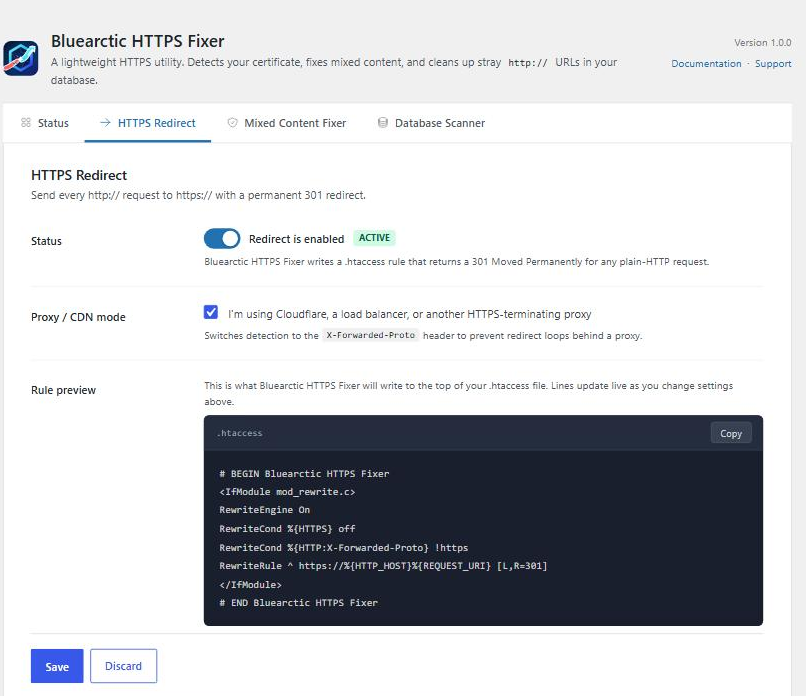
Writes a single, clean 301 redirect rule to your .htaccess file using WordPress’s own insert_with_markers() function — the same method WordPress uses for its own permalink rules. It is non-destructive, clearly marked, and trivially removable. Full support for sites behind Cloudflare, CDNs, and load balancers (X-Forwarded-Proto).
2. Mixed Content Fixer (on by default, requires WordPress 6.9+)
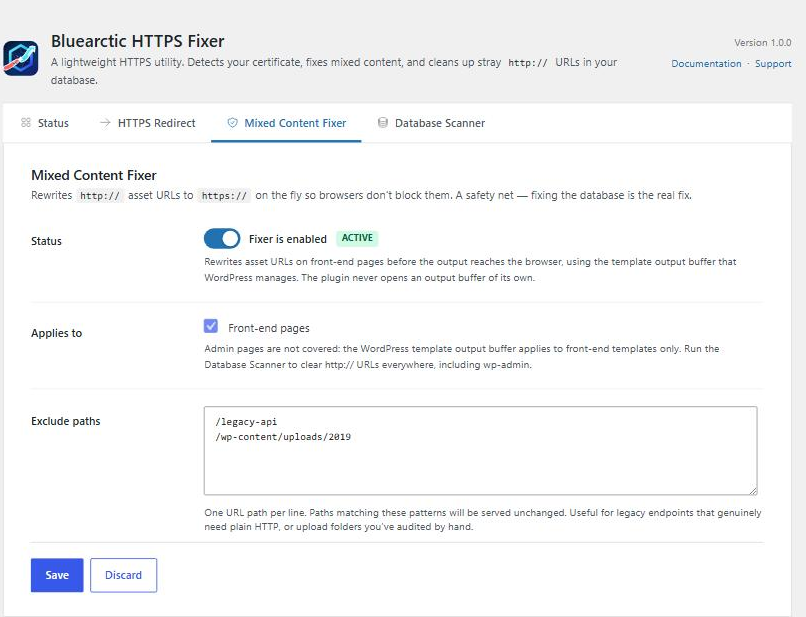
Rewrites http:// to https:// in your front-end page output before it reaches the browser. This is completely non-destructive — nothing in your database is touched. It works the instant you activate the plugin on an HTTPS site, with zero configuration required. On a site still served over plain HTTP it stays dormant, so activating the plugin before your certificate is ready is completely safe. Only your own domain’s URLs are rewritten; external URLs are never touched.
The rewrite runs on the template enhancement output buffer that WordPress manages itself, added in WordPress 6.9. The plugin never opens an output buffer of its own. On WordPress 6.8 and earlier this feature stays switched off and the Database Scanner below is the way to clear http:// URLs — it is the permanent fix in any case.
3. Database Scanner
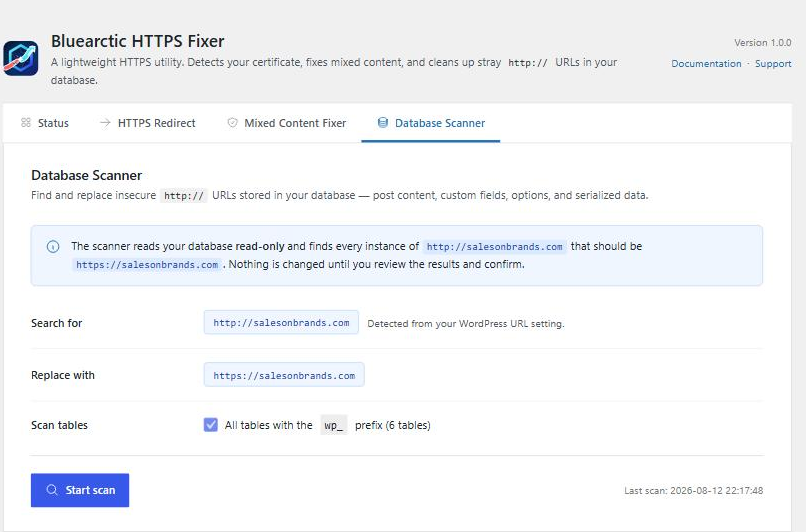
Scans your database for http:// URLs belonging to your site and lets you replace them with https:// in a controlled, step-by-step process. Every table is scanned read-only first — nothing is changed until you review the results and click Fix. Correctly handles serialized data used by Elementor, Divi, WooCommerce, and other page builders so byte-length annotations stay accurate. Covers posts, post meta, options, comments, term meta, and user meta.
What Bluearctic HTTPS Fixer does not do:
– No firewall
– No vulnerability scanner
– No login protection or 2FA
– No upsells or upgrade prompts
– No external API calls or phone-home
– No automatic database changes
Cloudflare / CDN / Load Balancer support
Enable „CDN / Proxy Mode“ in the HTTPS Redirect tab. This adds an X-Forwarded-Proto check to the redirect rule, which prevents infinite redirect loops when SSL is terminated at the proxy level rather than your own server.
The mixed content fixer is on by default — is that safe?
Yes. It rewrites your own domain’s http:// URLs in the HTML before it is sent to the browser, using the output buffer WordPress 6.9 opens and closes around your template. Nothing is written to the database or the filesystem. It only runs once your site is actually serving HTTPS — on a plain-HTTP site it stays dormant, so it can never break a site that has no certificate yet. Deactivate the plugin and it is as if it was never there.
Why does the fixer need WordPress 6.9?
WordPress 6.9 introduced a template output buffer that plugins can filter, so a plugin no longer has to open a PHP output buffer of its own to modify a page. Bluearctic HTTPS Fixer uses only that buffer. That keeps the plugin out of the shared output buffer stack entirely, which is the safest way to do this and avoids conflicts with caching and optimisation plugins. On older WordPress the fixer is simply unavailable — everything else in the plugin works normally.
What about database URLs still set to http://?
On WordPress 6.9+ the fixer handles these transparently at runtime. For a permanent fix on any version, use the Database Scanner tab — it scans every table, shows you exactly what will change with a full preview, and lets you apply the fix in one click. Serialized data (Elementor, WooCommerce, Divi) is handled correctly. Nothing is changed until you review and confirm.
Maletgs dal visur
Installaziun
- Upload the
bluearctic-https-fixerfolder to the/wp-content/plugins/directory, or install directly from the WordPress plugin directory. - Activate the plugin through the Plugins screen in WordPress.
- Go to Settings Bluearctic HTTPS Fixer.
- On WordPress 6.9 or later the mixed content fixer is already running. Enable the HTTPS redirect when your SSL certificate is confirmed active.
FAQ
-
Does Bluearctic HTTPS Fixer work with Cloudflare?
-
Yes. Enable „CDN / Proxy Mode“ in the HTTPS Redirect tab. This adds the X-Forwarded-Proto header check that Cloudflare and most other proxies use.
-
Will enabling the redirect break my site?
-
Only if your SSL certificate is not installed. The Status tab shows a warning if no certificate is detected. Always confirm your certificate is active at
https://yoursite.combefore enabling the redirect. -
How do I undo the .htaccess changes?
-
Click „Remove Redirect Rules from .htaccess“ in the HTTPS Redirect tab. Only the Bluearctic HTTPS Fixer block is removed; everything else in your .htaccess is untouched. The rules are also removed automatically when you deactivate or delete the plugin.
-
Does the mixed content fixer change my database?
-
No. It rewrites URLs in the page HTML on the fly, inside the output buffer WordPress manages. Your database is unchanged.
-
My .htaccess is not writable. What do I do?
-
The plugin will show you the exact rule block to copy. Paste it into your
.htaccessfile manually, before the WordPress permalink block. Note that .htaccess is specific to Apache and LiteSpeed servers — if you are running Nginx or IIS, you will need to add the redirect rule in your server configuration instead. -
Is this plugin compatible with multisite?
-
Single-site is fully supported in v1.0. Multisite support is planned for a future release.
-
Does the Database Scanner handle WooCommerce and Elementor data?
-
Yes. Both plugins store data as PHP serialized strings, which break if you do a naive search-and-replace (the byte-length annotations become wrong and WordPress cannot read the data). Bluearctic HTTPS Fixer unserializes the value, replaces URLs recursively, and re-serializes — keeping all annotations correct. Nested serialization (Elementor stores serialized strings inside serialized arrays) is handled as well.
-
Is the Database Scanner safe to run on a live site?
-
The scan is completely read-only — it changes nothing. The fix step updates rows in batches of 50, with a confirmation modal before anything is written. We strongly recommend a database backup before running the fix, and the plugin reminds you of this before you proceed.
-
What does Bluearctic HTTPS Fixer do when deactivated?
-
The HTTPS redirect rule is removed from
.htaccessautomatically when you deactivate the plugin. Your settings are preserved so they are restored if you reactivate. WordPress Site URL and Home URL settings are not touched on deactivation — those are WordPress core settings and reverting them to HTTP could break a live HTTPS site. -
What data does this plugin store?
-
Bluearctic HTTPS Fixer stores four options in
wp_options:bahf_redirect_enabled,bahf_proxy_mode,bahf_fixer_enabled, andbahf_fixer_exclusions. It also saves the last scan result (bahf_last_scan_time,bahf_last_scan_count) and a short-lived fix log as a transient. No data is sent to external servers. Everything is removed when the plugin is deleted.
Reviews
There are no reviews for this plugin.
Contributors & Developers
“Bluearctic HTTPS Fixer” is open source software. The following people have contributed to this plugin.
Contributors
Translate “Bluearctic HTTPS Fixer” into your language.
Interested in development?
Browse the code, check out the SVN repository, or subscribe to the development log by RSS.
Changelog
1.0.0
- Initial release.
- HTTPS redirect via .htaccess using
insert_with_markers(). - Mixed content fixer built on the WordPress 6.9 template enhancement output buffer — enabled by default, with path exclusions. The plugin opens no output buffer of its own; on WordPress 6.8 and earlier the fixer is unavailable and the Database Scanner is the supported route.
- CDN / Proxy mode for Cloudflare and load-balanced setups (X-Forwarded-Proto).
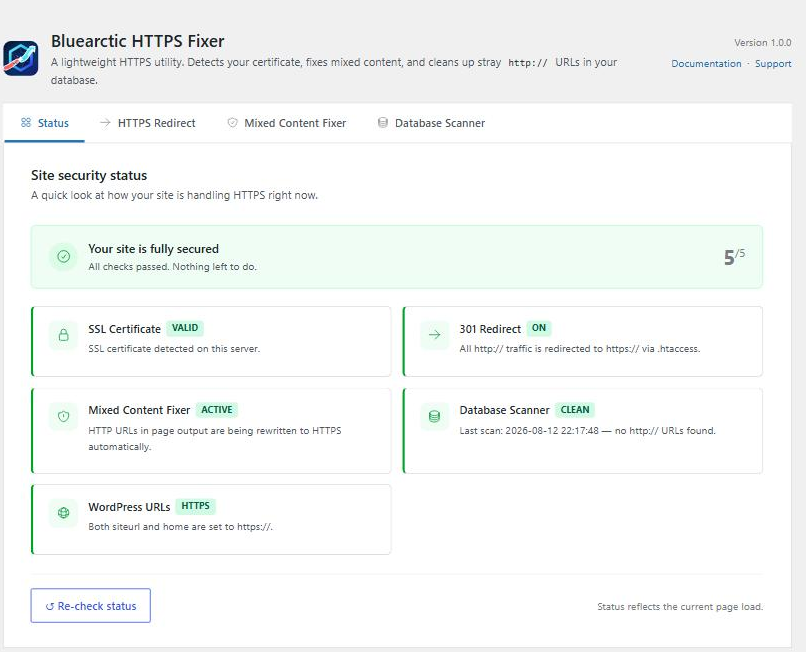
- Status dashboard with at-a-glance health checks for certificate, redirect, fixer, database, and WordPress URL settings.
- Database Scanner — scans all core tables for
http://URLs, handles serialized data (Elementor, WooCommerce, Divi), shows a preview, and fixes with explicit user confirmation in batches of 50 rows. - One-click fix for WordPress siteurl / home still set to http://, offered both on the Status tab and inline when you enable the HTTPS redirect. Only offered while wp-admin is actually being served over HTTPS, so it can never lock you out of your own dashboard.
- Deactivation removes .htaccess redirect rules; settings are preserved for reactivation.
- Clean uninstall — removes all options, the fix log transient, and the .htaccess block on plugin deletion.